Klaviyo default value for first name: fix the \"Hi ,\" greeting
How to set a default value for first name in Klaviyo with the default filter, when to use a conditional instead, and how to test profiles with no name.
Quick answer
In Klaviyo you set a default value for first name with the default filter: {{ first_name|default:'there' }}. If the profile has no first name, the email shows "there" instead of leaving "Hi ," with a gap. You can type the same default in the Default text field when you insert the first name from a text block. If a generic word doesn't fit your sentence, use a conditional with two versions of the sentence, and always preview the email with a profile that has no name before you send.
What you'll find
- How to set a default value for first name in Klaviyo
- What prints with empty names, missing names and names in capitals
- When a conditional works better than a default
- Which fallback text to write for each kind of sentence
- How to test it and find the profiles without a name
- How to do it with Remite
How do you set a default value for first name in Klaviyo?
Klaviyo templates use a syntax based on Django. A variable goes between double curly braces. A filter goes after a vertical bar. The default filter tells Klaviyo what to print when the profile doesn't have that property.
First name and last name have their own short tags. You don't need the person. prefix for them:
Hi {{ first_name|default:'there' }},
A profile with the name Lucia sees "Hi Lucia,". A profile without a name sees "Hi there,".
You can get the same result without typing code:
- Open the email and click inside a text block.
- Click the personalization icon in the formatting bar.
- Pick First name from the list.
- Write your fallback in the Default text field, for example "there".
- Choose a capitalization if you need one, and click Insert.
Klaviyo writes the tag for you. If you picked title case (the "Ag" option), the tag comes out as {{ first_name|title|default:'there' }}. The title filter capitalizes the first letter and lowercases the rest.
For any other profile property the pattern is the same, with person. in front or with lookup when the name has spaces:
{{ person.city|default:'your city' }}
{{ person|lookup:'Favorite Store'|default:'our store' }}
Once you start with lookup, Klaviyo asks you to keep using lookup for anything nested after it.
| Where you add the name | How you set the fallback | What Klaviyo writes |
|---|---|---|
| Text block, personalization menu | Default text field | {{ first_name|default:'there' }} |
| Text block, with title case | Default text + "Ag" capitalization | {{ first_name|title|default:'there' }} |
| HTML block or code | Type the filter yourself | {{ first_name|default:'there' }} |
| Subject line or preview text | Type the filter yourself | Hi {{ first_name|default:'there' }} |
| Custom property with spaces | lookup plus default |
{{ person|lookup:'Favorite Store'|default:'our store' }} |
Checked against the Klaviyo documentation in September 2026: message personalization reference and the help article on adding a first name to a message.
What happens when the name is empty, missing or in capitals?
The default filter covers the case where the profile doesn't have the property. Real lists have more cases than that. Some profiles have the name in capitals because they typed it that way. Some have a name that is only a space. Some have the email address in the name field because a form mapped it wrong.
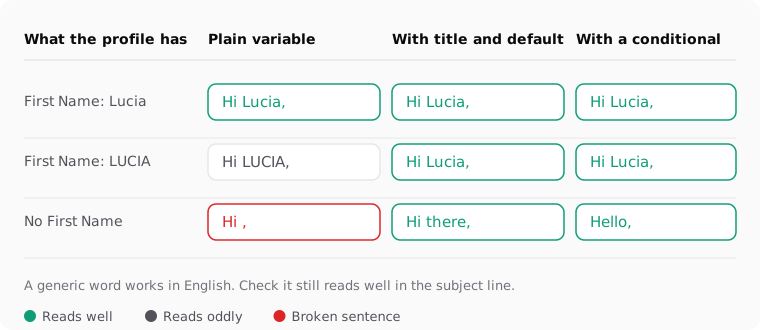
Klaviyo's help center describes the fallback as the text for recipients who don't have the property set. It doesn't say how blank values behave. In Django, the language Klaviyo's syntax comes from, the default filter applies when the value is empty or false, while a single space counts as a value. Don't rely on either rule. Preview a real profile of each type and look.
| What the profile has | Plain {{ first_name }} |
With |title|default:'there' |
What to do |
|---|---|---|---|
| A normal name | Hi Lucia, | Hi Lucia, | Nothing |
| Name in capitals (LUCIA) | Hi LUCIA, | Hi Lucia, | Add title |
| No First Name property | Hi , | Hi there, | Add default |
| First Name set but blank | Check in preview | Check in preview | Preview a real blank profile |
| An email address as the name | Hi lucia@shop.com, | Hi Lucia@shop.com, | Fix the form mapping and the data |
| A compound name (Mary Ann) | Hi Mary Ann, | Hi Mary Ann, | Nothing |
One thing to watch with title: it lowercases everything after the first letter of each word. Names like "McDonald" or "DeLuca" come out as "Mcdonald" and "Deluca". If your list has many of those, and your data is clean, skip title and use the name as typed.
When should you use a conditional instead of a default?
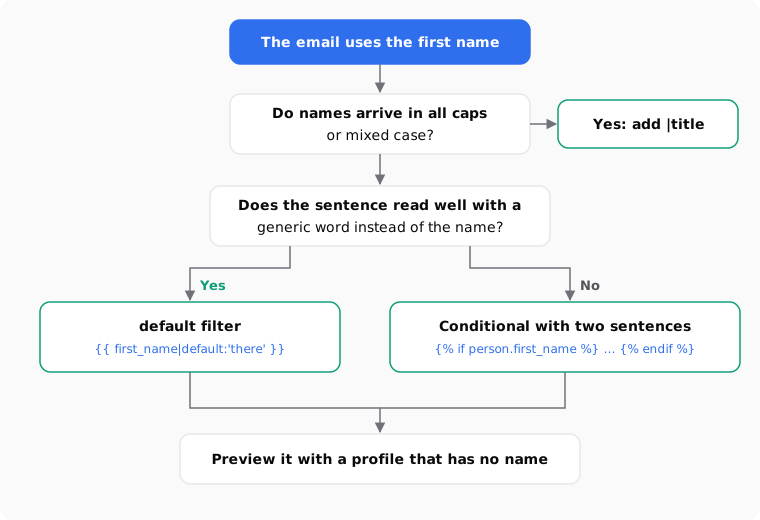
A default works when a generic word fits in the same spot as the name. "Hi there," reads fine. "Lucia, your order has shipped" doesn't work as "there, your order has shipped".
When the sentence only makes sense with a name, write two sentences and let Klaviyo choose:
{% if person.first_name %}
  {{ first_name|title }}, your order has shipped.
{% else %}
  Your order has shipped.
{% endif %}
The first line checks whether the property is there. If it is, the contact gets the personal version. If it isn't, they get a sentence that was written to work without a name. Nobody sees a filler word.
Two practical notes:
- The text editor can hide the code. Klaviyo says that
{% if %},{% else %}and{% endif %}may disappear from the inline text editor even though they're still there. If you need to edit them, use an HTML block or the tag builder. Details are in the conditional logic reference. - Keep the condition short. One condition around one sentence is easy to review. A whole email wrapped in conditions is hard to check and easy to break.
What fallback text should you write?
The fallback must read well in the exact sentence where it lands. Read the sentence out loud with the fallback in place. If it sounds odd, change the fallback or switch to a conditional.
| Kind of sentence | Weak fallback | Better option |
|---|---|---|
| Greeting at the top | default:'customer' → "Hi customer," |
default:'there' → "Hi there," |
| Subject line with the name first | default:'friend' → "friend, 20% off ends tonight" |
Conditional, or a subject that doesn't start with the name |
| Name in the middle of a sentence | default:'you' → "We picked these for you, you" |
Rewrite the sentence so it works without the name |
| Sign-off to a VIP | default:'valued customer' |
Conditional: named version and neutral version |
| Short push or SMS | default:'there' in a 40-character text |
Leave the name out; space is too tight |
A few rules that help:
- Match your brand's tone. "Hey there" suits a casual store. A bank or a clinic may prefer "Hello," with no name at all.
- Avoid words that sound like a database. "Customer", "user" or "subscriber" in a greeting reads like a system message.
- Think about every language you send in. In Spanish, for example, many fallbacks carry a gender, which is one more reason to prefer a conditional there. If you send one template in several languages, each language needs its own fallback. The multilingual template guide shows how to structure that.
Does the fallback work in the subject line, preheader and SMS?
Yes. Klaviyo supports the first name variable in email body text, the subject line, SMS and push, in both campaigns and flows. The same default filter works in all of them.
The risk is different in each place. A broken greeting in the body is ugly. A broken subject line is visible in the inbox before anyone opens the email. It's also the first thing people read on a phone.
| Place | Fallback needed? | Watch out for |
|---|---|---|
| Email body greeting | Yes | Missing comma or double space around the name |
| Subject line | Yes, always | Subjects that start with the name; long names truncating the rest |
| Preview text | Yes | Preview text cut short on mobile |
| SMS | Yes | Character count; a long fallback can push the message over the limit |
| Push notification | Yes | Very short space; often better without the name |
If you're not sure the name adds anything to a subject line, leave it out. Test it as a variant instead of adding it by default.
How do you test it before sending?
Test with real profiles, not only with your own. Your profile has a name, so it will always look right.
- Click Preview & test in the email editor.
- Use the Search profiles field to pick a profile that has a first name.
- Switch to a profile that has no first name. This is the one that shows problems.
- If you have one, pick a profile with the name in capitals or with odd data.
- Send a test to your inbox to check the subject line and preview text as they really appear.
For flows triggered by an event, the preview uses the profiles that recently took that action. You toggle between recent events instead of searching. Klaviyo explains both cases in how to preview and send test emails.
To find profiles without a name, build a segment with the condition Properties about someone → First Name → is not set. The size of that segment tells you how much the fallback matters. If it's a large share of your list, the greeting fallback is only a patch. Look at where those contacts come from. Often it's a sign-up form that only asks for an email, or an integration that doesn't map the name field.
Klaviyo separates two cases here: a property that doesn't exist on the profile, and a property that exists with no value. When you build segments on names, check both before you draw conclusions.
How to do it with Remite
Remite writes the variables and their fallbacks in Klaviyo syntax when you export, so you don't type them by hand. This is the real flow.
- Marca. When you set up your brand, you pick Klaviyo as your platform. Remite uses
first_nameas the name field by default. - Personalizar con. In the brief, choose Nombre (first name) if you want the email to use it. If you don't pick anything, the email isn't personalized.
- Antes de generar. Remite reviews the brief and may ask one or two quick questions before writing.
- The fallback is part of the text. When a sentence breaks without the name, Remite adds a fallback to that variable. Where a sentence reads fine empty, it leaves the variable without one. In the editor you see the email with sample data.
- Change it by chat or with Comentar. If you want "Hello" instead of "Hi there", ask in the chat, or select the text and leave a comment on it.
- Exportar. In the export window, the Campos de tus contactos section shows which Klaviyo field each variable uses. If your account calls it something else, change it there and confirm with Sí, coinciden. If you have no name field at all, Remite uses the fallback text and no variable.
- The result. The name comes out as
{{ first_name|default:'there' }}, with your fallback, and the unsubscribe link as{% unsubscribe_link %}. - Test and send. Enviarme una prueba sends you the email with sample data. Enviar a Klaviyo (beta) creates the template in your account, or updates it if it already exists.
Two limits, so you know what to expect. Remite doesn't add title for you: if your names arrive in capitals, add it in Klaviyo or fix the data. And it writes the fallback version, not the two-sentence conditional. If a sentence needs the conditional, write it in Klaviyo with the example above.
For the same syntax in other platforms, see the first name and unsubscribe cheat sheet for 21 platforms. If you want to know which lifecycle emails matter most for a store, the lifecycle levers guide and the lifecycle page cover that. An automatic lifecycle diagnosis is coming soon.
Frequently asked questions
What is the syntax for a default first name in Klaviyo?
Use {{ first_name|default:'there' }}. Replace "there" with your fallback. Add |title before default if you want the name capitalized.
Why does my Klaviyo email still show "Hi ,"?
The tag probably has no default filter, or the profile has a value that isn't empty, such as a space. Open Preview & test with that exact profile and look at what it has in First Name.
Can I set one default for the whole account?
The fallback lives in each tag, so you set it wherever you use the variable. Saving a text block or template with the tag already written saves you from retyping it.
Does the default filter work with custom properties?
Yes. Write {{ person.property|default:'text' }}, or use lookup if the property name has spaces. The filter works the same way for any profile property.
Should I use the default filter or an if statement?
Use default when a generic word fits in the sentence. Use {% if %} when the sentence only makes sense with a real name, and write a second version for everyone else.
Can I use the fallback in the subject line?
Yes. Klaviyo accepts the same tag and filter in the subject line and preview text. Check the result in a real inbox, because that's where a broken subject is most visible.
How do I find contacts with no first name?
Create a segment with Properties about someone, First Name, is not set. Then check where those contacts come from, usually a form or an integration that doesn't collect the name.
Does Remite add the fallback automatically?
Yes, when a sentence would break without the name. It exports the name as {{ first_name|default:'…' }} with the text you see in the editor, and you can change that text by chat or with a comment.
If you'd rather not write these tags by hand for every platform, you can join the Remite waitlist.