Braze custom attribute Liquid syntax: ${field} vs custom_attribute
How to write a custom attribute in Braze Liquid: when to use ${field} or custom_attribute.${field}, with defaults, if tags and errors that print nothing.
Quick answer
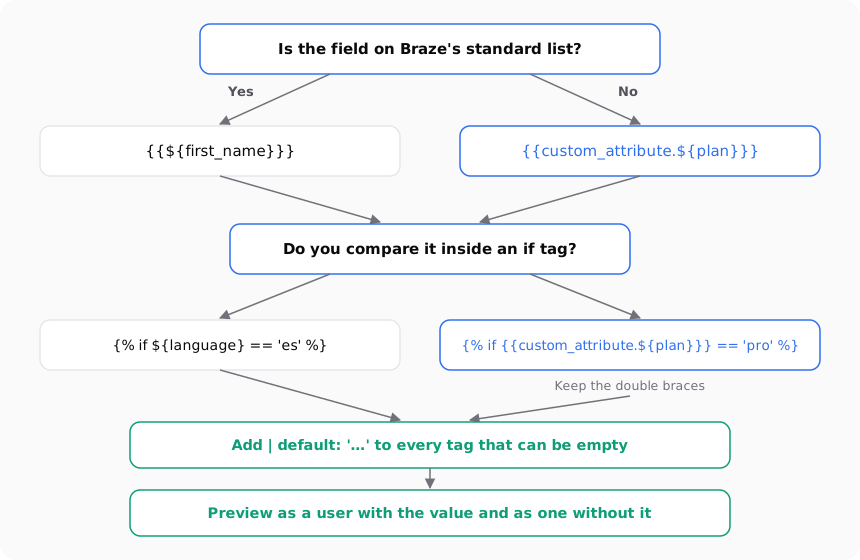
In Braze, standard attributes go straight inside the tag: {{${first_name}}}. Custom attributes need the custom_attribute. prefix: {{custom_attribute.${plan}}}. Inside an {% if %} tag, a custom attribute keeps its double curly braces: {% if {{custom_attribute.${plan}}} == 'pro' %}. Add | default: '...' to any tag that could come out empty, and preview the message as a real user before you send.
What you'll find
- How to tell a standard attribute from a custom one
- The exact syntax for each case, with defaults
- How to use custom attributes inside if tags
- The errors that make a tag print nothing
- How to check it before you send
- How to do it with Remite
How do you know if an attribute is standard or custom?
Braze keeps a fixed list of standard attributes. Every workspace has them. Your team didn't create them. Anything your developers or your data team send on top of that list is a custom attribute.
This matters because Braze writes the two kinds differently. If you use the standard form for a custom attribute, the tag doesn't point at your data.
The standard attributes you'll use most in email:
| Attribute | How you write it | What it holds |
|---|---|---|
| First name | {{${first_name}}} |
The user's first name |
| Last name | {{${last_name}}} |
The user's last name |
{{${email_address}}} |
The email address on the profile | |
| Language | {{${language}}} |
The user's language code, for example en |
| Country | {{${country}}} |
The country on the profile |
| City | {{${city}}} |
The city on the profile |
| Time zone | {{${time_zone}}} |
The user's time zone |
| User ID | {{${user_id}}} |
Your external ID for the user |
Braze lists a few more, such as ${date_of_birth}, ${gender}, ${phone_number} and ${braze_id}. The full list is on the supported personalization tags page.
If the field isn't on that list, treat it as custom. Plan, loyalty tier, favorite store, points balance, last product viewed: all custom.
To see the custom attributes in your workspace, go to Data Settings > Custom Attributes. The name you see there is the name you type in the tag. Braze says custom attributes are case-sensitive, so Plan and plan are two different attributes. The details are in Manage custom data.
What is the syntax for a custom attribute in Braze?
A Braze personalization tag has three parts. The outer double curly braces print a value. The ${...} wraps the attribute name. And for custom attributes, custom_attribute. goes in front of the ${...}.
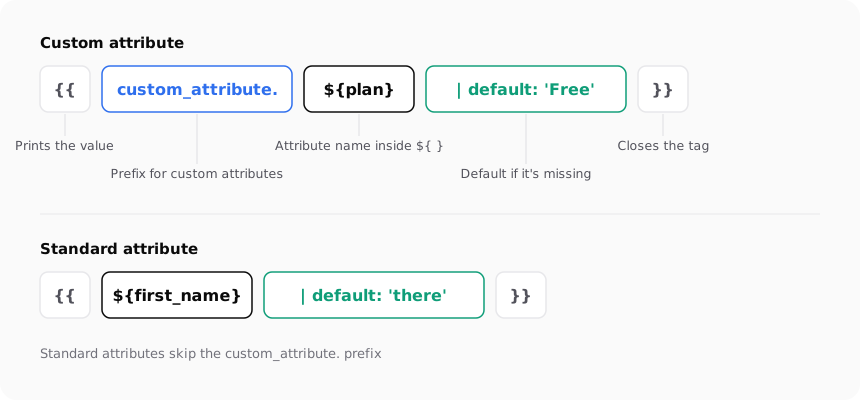
Here are the two forms side by side:
Hi {{${first_name}}},
Your plan: {{custom_attribute.${plan}}}
Most tags should also carry a default. The default filter tells Braze what to print when the attribute is missing:
Hi {{${first_name} | default: 'there'}},
Your plan: {{custom_attribute.${plan} | default: 'Free'}}
You have {{custom_attribute.${reward_points} | default: 0}} points.
A number can take a number as its default, without quotes. A text needs quotes.
| What you want | Standard attribute | Custom attribute |
|---|---|---|
| Print the value | {{${first_name}}} |
{{custom_attribute.${plan}}} |
| Print with a default | {{${first_name} | default: 'there'}} |
{{custom_attribute.${plan} | default: 'Free'}} |
| Compare in an if tag | {% if ${language} == 'es' %} |
{% if {{custom_attribute.${plan}}} == 'pro' %} |
| Numeric default | Not usually needed | {{custom_attribute.${reward_points} | default: 0}} |
Checked against the Braze documentation in September 2026: supported personalization tags, conditional messaging logic and setting default values.
You don't have to type all of this. Braze has an Add Personalization option next to its templated text fields. You pick the attribute, write a default, and Braze inserts the Liquid where your cursor is. It's a good way to see the right form once, and then copy it.
How do you use a custom attribute in an if tag?
This is the part that trips most people up. A standard attribute goes into an {% if %} tag as it is:
{% if ${language} == 'es' %}
Hola
{% elsif ${language} == 'fr' %}
Bonjour
{% else %}
Hello
{% endif %}
A custom attribute keeps its double curly braces inside the if tag. Braze's documentation shows it this way:
{% if {{custom_attribute.${plan}}} == 'pro' %}
Thanks for being on Pro.
{% else %}
Upgrade to Pro and get free returns.
{% endif %}
It looks odd, because in standard Liquid you don't nest braces inside a tag. In Braze, this is the documented form for custom attributes. Write it that way.
The comparison depends on the attribute's data type. The same pattern works for all of them:
| Data type | Example condition |
|---|---|
| Text | {% if {{custom_attribute.${favorite_color}}} == 'blue' %} |
| Number | {% if {{custom_attribute.${shoe_size}}} == 10 %} |
| Boolean | {% if {{custom_attribute.${registration_complete}}} == true %} |
| Array | {% if {{custom_attribute.${last_viewed_shows}}} contains 'homeland' %} |
Two more notes from the docs:
- Use
elsif, notelif. Liquid writes itelsif. Klaviyo users often bringeliffrom Django, and Braze won't read it. - Check blanks first. To find users with no value, Braze offers
== null(not set) and== blank(not set, only spaces, or false). The docs say to check blank values before other variables, to avoid a Liquid error.
When you need the same custom attribute several times, save it once with assign and a default. Then use the variable:
{% assign is_premium = {{custom_attribute.${premium_user}}} | default: false %}
{% if is_premium %}
Hi {{${first_name} | default: 'there'}}, thanks for being a premium member.
{% else %}
Hi {{${first_name} | default: 'there'}}, premium members get free shipping.
{% endif %}
One warning from Braze: inside an assign tag, anything between single quotes is a literal string. If you put a personalization tag in quotes, Braze won't fill it in.
Why does my Braze personalization print nothing?
When a tag comes out empty, it's usually one of a few mistakes. Go through this table with the tag in front of you.
| What you wrote | What's wrong | What to write |
|---|---|---|
{{${plan}}} |
plan is custom, not standard |
{{custom_attribute.${plan}}} |
{{custom_attribute.plan}} |
Missing ${...} around the name |
{{custom_attribute.${plan}}} |
{% if custom_attribute.${plan} == 'pro' %} |
Custom attribute without braces inside the if | {% if {{custom_attribute.${plan}}} == 'pro' %} |
{{custom_attribute.${Plan}}} |
Wrong case; names are case-sensitive | The exact name from Data Settings |
{{${firstname}}} |
Not the standard name | {{${first_name}}} |
{% elif ... %} |
Django syntax, not Liquid | {% elsif ... %} |
{{${first_name}}} alone |
No default, so an empty profile prints a gap | {{${first_name} | default: 'there'}} |
There's one case the default doesn't cover. Braze's docs say the default shows for empty values but not for blank ones. A blank value is one that only has spaces. If a form saved a space as the first name, default won't kick in. To catch that, use a condition with == blank and write the fallback sentence yourself:
{% if ${first_name} == blank %}
Hi there,
{% else %}
Hi {{${first_name}}},
{% endif %}
Also check that the attribute has data at all. An attribute can exist in Data Settings and still be empty for most users. That happens when an integration stopped sending it, or when it only gets set for some sign-up paths. The syntax can be perfect and the email still prints the default for most people.
How do you test custom attributes before sending?
Your own profile is a bad test. You probably have every attribute filled in. Test with users who don't.
- Open the message and go to the preview.
- Choose to preview as a user. Braze lets you pick a random user, search for an existing user by ID or email, or build a custom user.
- Pick an existing user who has the custom attribute set. Check that the value prints.
- Pick one who doesn't have it. Check that the default reads well in the sentence.
- Switch to a custom user and type edge cases: a value in capitals, a value with only a space, each option your if tag compares against.
- Send a test to your inbox. When you send a test with personalization, Braze tells you to pick an existing user or a custom user, so the test carries real values.
If you use abort_message() in the same message, remember it stops the send for users who meet the abort condition. A test that never arrives may be an aborted test. Braze explains how to handle that on its abort messages page.
A quick check before you ship: read every sentence with a personalization tag out loud twice. Once with a real value. Once with the default. If the default version sounds strange, change the default or write two versions with an if tag.
How to do it with Remite
Remite writes the Braze Liquid for you when you export. It tells standard and custom attributes apart, so you don't have to remember which form goes where. This is the real flow.
- Marca. When you set up your brand, pick Braze as your platform. Remite uses
first_nameandlanguageas the name and language fields. - Personalizar con. In the brief, choose Nombre if the email should use the first name. To use a custom attribute, type it in Otro campo (for example
plan) and click Añadir. You can also click Cargar cabecera CSV to add fields from your audience file. Remite only reads the column names. The rows never leave your computer. - Antes de generar. Remite reviews the brief and may ask one or two questions before it writes the email.
- Edit by chat or with Comentar. The editor shows the email with sample data. If a sentence needs a different fallback, ask in the chat or select the text and leave a comment.
- Exportar. The Campos de tus contactos section lists every field the email uses and the name it will have in Braze. Fix any name that doesn't match your workspace, then confirm with Sí, coinciden. If a name looks like a CSV label with spaces, Remite warns you.
- The result. Standard fields come out as
{{${first_name} | default: 'there'}}. Everything else comes out as{{custom_attribute.${plan} | default: 'Free'}}. If you export all languages in one file, the language condition uses{% if ${language} == 'es' %}for the standard field, or{% if {{custom_attribute.${idioma}}} == 'es' %}if your language lives in a custom attribute. It useselsiffor the extra languages. - Test and send. Enviarme una prueba sends the email to your inbox with sample data. Enviar a Braze (beta) creates the email template in your account, or updates it if one with the same name exists. You need a REST API key with the
templates.email.create,templates.email.updateandtemplates.email.listpermissions, and your instance, such asiad-01orfra-01. The template shows up in Templates > Email Templates.
A few limits, so you know what to expect. Remite writes values and defaults, and the language conditions. It doesn't write other if tags for you, such as a message that changes by plan. Use the examples above for that. It doesn't add == blank checks either. And it writes the unsubscribe link as {{${unsubscribe_url}}}. Braze now recommends {{${set_user_to_unsubscribed_url}}} and says the older tag still works in existing emails. If your team uses the newer tag, swap it in Braze after you import.
For the same tags in other platforms, see the first name and unsubscribe cheat sheet for 21 platforms. The multilingual template guide goes deeper into language conditions. If you also send from Klaviyo, the Klaviyo default value guide covers its version of the fallback. For which emails to build in the first place, read the lifecycle levers guide or the lifecycle page. An automatic lifecycle diagnosis is coming soon.
Frequently asked questions
What is the difference between ${first_name} and custom_attribute in Braze?
${first_name} is a standard attribute, and Braze writes standard attributes without a prefix. Anything your team created is custom and needs custom_attribute. in front, as in {{custom_attribute.${plan}}}.
Why do custom attributes need double braces inside an if tag?
That's the form Braze documents for custom attributes in conditions: {% if {{custom_attribute.${plan}}} == 'pro' %}. Standard attributes don't need it: {% if ${language} == 'es' %} works as it is.
How do I set a default value for a custom attribute?
Add the default filter inside the tag: {{custom_attribute.${plan} | default: 'Free'}}. For numbers, write the number without quotes, as in | default: 0.
Are Braze custom attribute names case-sensitive?
Yes. Braze treats Plan and plan as two different attributes. Copy the name exactly as it appears in Data Settings > Custom Attributes.
Why does my default not show for some users?
The default shows when the value is empty or missing, but not when it's blank, meaning only spaces. Check for that case with {% if ${first_name} == blank %} and write the fallback sentence yourself.
Should I write elif or elsif in Braze?
Write elsif. Braze uses Liquid, and Liquid spells it that way. elif comes from Django, which is what Klaviyo uses.
Can I use a custom attribute in the subject line?
Yes. The same tags work in the subject line and preheader. Always add a default there, because a gap in the subject is visible before anyone opens the email.
Does Remite know which Braze attributes are custom?
Yes. It writes the fields on Braze's standard list with ${...} and every other field with custom_attribute.${...}. You check and fix the names in the export window before you download or send the template.
If you'd rather not keep this syntax in your head for every platform you use, you can join the Remite waitlist.