Iterable Handlebars default value: fix empty fields in your emails
How to set a default value in Iterable with defaultIfEmpty or #if and else, which values count as empty, and how to preview users with missing fields.
Quick answer
In Iterable you set a default value with the defaultIfEmpty helper: {{defaultIfEmpty firstName "there"}}. If firstName is null, missing or an empty string, the email shows "there" instead of a gap. When one word doesn't fix the sentence, use {{#if firstName}}...{{else}}...{{/if}} and write two versions of it. Then open the template's Preview with data, load a user without that field and check the result before you send.
What you'll find
- How to set a default value with Handlebars in Iterable
- Which values Iterable treats as empty
- When #if and else work better than defaultIfEmpty
- Event fields, profile fields and names with spaces
- Defaults in the subject line, the preheader and the WYSIWYG editor
- How to test it before sending
- How to do it with Remite
How do you set a default value in Iterable?
Iterable templates use Handlebars. A field goes between double curly braces, like {{firstName}}. At send time, Iterable replaces it with the value from the user's profile or from the event that triggered the campaign.
If the value isn't there, Iterable prints nothing. "Hi {{firstName}}," becomes "Hi ,". That's the gap you want to avoid.
The shortest fix is the defaultIfEmpty helper. You give it the field and the text to show when the field is empty:
Hi {{defaultIfEmpty firstName "there"}},
A user called Ana sees "Hi Ana,". A user with no first name sees "Hi there,".
The second option is a block with #if and else. It does the same job, with more control over the whole sentence:
{{#if firstName}}Hi {{firstName}},{{else}}Hi there,{{/if}}
Both are valid. Which one you choose depends on the sentence, as the next sections show.
| What you write | What it does | Good for |
|---|---|---|
{{firstName}} |
Prints the value, or nothing | Fields that are always filled |
{{defaultIfEmpty firstName "there"}} |
Prints the value, or the default text | A word that slots into the sentence |
{{defaultIfEmpty nickname firstName}} |
Prints nickname, or firstName if it's empty |
Falling back from one field to another |
{{#if firstName}}...{{else}}...{{/if}} |
Shows one block or the other | Two different versions of a sentence |
{{capitalize firstName}} |
Capitalizes the first letter of each word | Names typed in lowercase |
Checked against the Iterable documentation in October 2026: Personalizing Templates with Handlebars.
Which values count as empty?
This is where most "why is it still blank?" questions come from. The two options treat values almost the same way, with one detail worth knowing.
defaultIfEmpty shows the default when the field is null, undefined or an empty string. For #if, Iterable's Handlebars treats these values as false: null, an empty string, an empty array, the boolean false and any number equal to zero. Everything else is true.
So for a text field like a first name, both behave the same: the default appears when the field is missing or empty.
The catch is a field that only contains a space. A space is a value. Neither defaultIfEmpty nor #if will treat it as empty, so the user sees "Hi ," with a double space. The same happens with a name saved as "-" or "." from a careless form. The template can't fix those. The data has to.
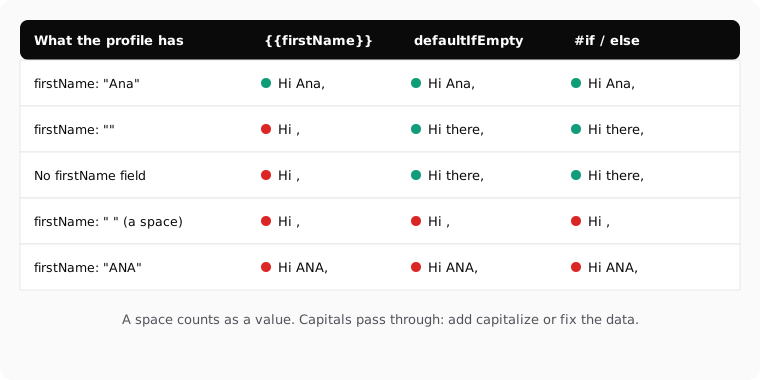
| What the user profile has | {{firstName}} |
defaultIfEmpty or #if |
What to do |
|---|---|---|---|
"Ana" |
Hi Ana, | Hi Ana, | Nothing |
"" (empty string) |
Hi , | Hi there, | Add a default |
No firstName field |
Hi , | Hi there, | Add a default |
" " (a space) |
Hi , | Hi , | Clean the data at the source |
"ANA" |
Hi ANA, | Hi ANA, | Fix the data, or accept it |
0 in a number field |
0 | Default with #if, value with defaultIfEmpty |
Use #if only when zero should hide the block |
The last row matters for numbers. With #if, a field equal to zero counts as false. If you write {{#if points}}You have {{points}} points{{/if}}, a user with 0 points sees nothing. Sometimes that's what you want. Sometimes it isn't.
About capitals: capitalize turns "ana maría" into "Ana María". Iterable documents it as capitalizing the first letter of each word. It doesn't say it lowercases the rest, so preview a name saved as "ANA" before you rely on it. If your list has many names in capitals, lower before capitalize is worth a test, and fixing the data is the safer route.
When should you use #if and else instead?
defaultIfEmpty works when one word or short phrase slots into the sentence. "Hi there," reads fine. "Ana, your order is ready" with a default becomes "there, your order is ready", which doesn't.
When the sentence needs a different shape without the name, write both versions:
{{#if firstName}}
  {{firstName}}, your order is ready.
{{else}}
  Your order is ready.
{{/if}}
Other cases where #if is the better tool:
- Whole blocks. If a user has no loyalty tier, hide the tier section instead of printing "Your tier: none".
- Punctuation. A comma after the name has no place once the name is gone.
- Languages with gender. In Spanish, many defaults have a gender. A neutral sentence without the name is often safer than a default word.
- Several fields. Iterable also has
#and,#orandelse ifto test more than one condition.
And when the email makes no sense without the field, don't send it. A coupon email without the coupon code is worse than no email. Iterable has a sendSkip helper that cancels the send for that user and records the skip with a reason:
{{#if couponCode}}
  Your code: {{couponCode}}
{{else}}
  {{sendSkip cause="missing coupon code"}}
{{/if}}
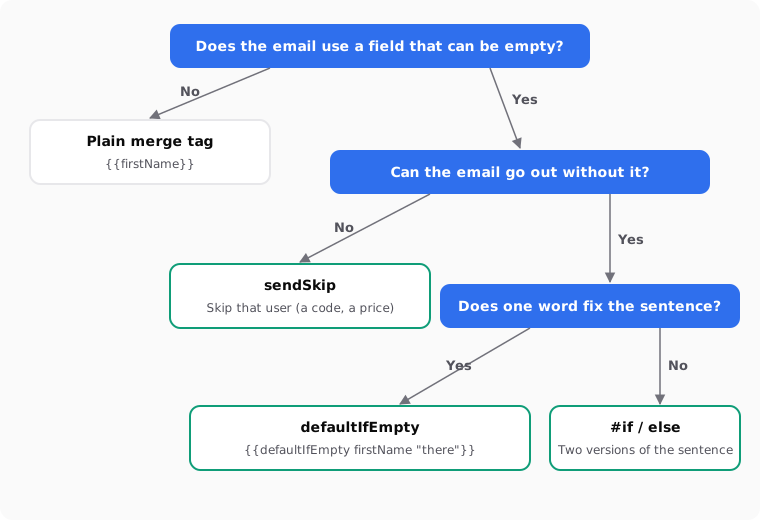
| Situation | Best option | Example |
|---|---|---|
| Greeting with the first name | defaultIfEmpty |
Hi {{defaultIfEmpty firstName "there"}}, |
| Name at the start of the sentence | #if / else |
Two versions of the sentence |
| A section that only applies to some users | #if without else |
Hide the loyalty block |
| One field or another | defaultIfEmpty with two fields |
{{defaultIfEmpty nickname firstName}} |
| A coupon code or a price | sendSkip |
Skip the users without the code |
| A field that is always filled | Plain merge tag | {{email}} |
Which field does Iterable read?
A default only helps if Iterable is looking at the right field. Three details trip people up.
Event fields win over profile fields. If the event that triggers the campaign has a field with the same name as a profile field, Iterable uses the event value. If the event sends firstName empty and the profile has a name, the user can get the default when you expected the name. Use {{profile.firstName}} to force the profile value.
Field names are case-sensitive. firstName, FirstName and first_name are three different fields. If your template says firstName and your profiles store first_name, every user gets the default. Check the exact name in your project before you blame the data.
Spaces, periods and leading numbers need square brackets. A field called First Name is written {{[First Name]}}. The same goes for the default: {{defaultIfEmpty [First Name] "there"}}. Iterable advises against periods in field names, because they clash with nested objects.
If you work with more than one platform, the cheat sheet of name and unsubscribe tags across 21 platforms shows the same greeting in each syntax. The logic is the same in Klaviyo's default filter and in Braze custom attributes with Liquid, with different words.
Does it work in the subject line and preheader?
Yes. Iterable lets you use Handlebars in the subject line and the preheader, as well as in the body. The same defaults apply:
{{defaultIfEmpty firstName "Hey"}}, your cart is waiting
Two things to keep in mind. The subject line and preheader don't render HTML, so keep them to plain text and merge tags. And a default that reads fine in the body can look odd in a subject. "There, your cart is waiting" doesn't work. Write the default for the sentence it lives in.
The WYSIWYG editor has its own quirk. Block helpers like #if placed between HTML tags can cause errors when you switch to the visual editor. Iterable recommends wrapping each block helper in an HTML comment:
<!--{{#if firstName}}-->
  <p>Hi {{firstName}},</p>
<!--{{else}}-->
  <p>Hi there,</p>
<!--{{/if}}-->
Only comment out the block helpers. Don't comment out {{firstName}} itself, or the value won't render.
Iterable also keeps the spaces and line breaks around your merge tags. If a default sits inside a link or a code fragment, add a tilde to trim the whitespace: {{~defaultIfEmpty firstName "there"~}}.
How do you test it before sending?
Preview with real profiles, including the bad ones. Iterable's preview lets you do that without changing anyone's data.
- Save the template. Unsaved changes don't show up in the preview.
- Go to Content > Templates, open the menu with the three dots and choose Preview with data. Or open the template and click Preview.
- Enter the email of a user and click Load user data.
- Edit the loaded data to test a case: delete
firstName, set it to an empty string, set it to a space. This doesn't change the real profile. - Check the subject line, the preheader and the body.
- Send a test from the preview. It uses the loaded data.
Checked against the Iterable documentation in October 2026: Previewing Templates.
| What goes wrong | Likely cause | How to fix it |
|---|---|---|
| Still "Hi ," with a default | Field name in a different case | Copy the exact name from the user profile |
| Default shows for users who have a name | The event sends the field empty | Use profile.firstName |
| "Hi ," with a double space | The field contains a space | Clean the data at the source |
| Error when opening the visual editor | Block helpers between HTML tags | Wrap them in HTML comments |
| Nothing renders where the name should be | The merge tag was commented out | Only comment out block helpers |
| Block hidden for users with 0 points | #if treats zero as false |
Compare the value with #ifGt or #ifEq |
To find how many users are affected, build a segment in Iterable for users where the first name field doesn't exist or is empty. If it's a large share of your list, a default is a patch. Collecting the name at signup is the real fix.
How to do it with Remite
Remite writes the merge tags and their defaults in Iterable's Handlebars when you export, so you don't type them by hand. This is the real flow.
- Brand. You set up your brand once and pick Iterable as your platform. Remite uses
firstNamefor the name andlocalefor the language, unless you tell it otherwise. With Connect CRM and a server key, Remite reads your real user fields and links each variable to the right one. Your keys stay in your browser. - Personalize with. In the brief, you choose whether the email uses the first name or other fields from your CRM.
- Before generating. Remite reviews the brief and may ask one or two quick questions before writing.
- The fallback is part of the text. When a sentence breaks without the name, Remite adds a fallback to that variable. When the sentence reads fine empty, it leaves the variable without one. You can change the fallback in the chat, or select the text and use Comment.
- Export. The Your contact fields section shows which Iterable field each variable uses. If your project calls it something else, change it there and confirm with Yes, they match. The name comes out as
{{#if firstName}}{{firstName}}{{else}}there{{/if}}, the unsubscribe link as{{unsubscribeUrl}}, and several languages as#eqblocks on your language field if you choose One with every language. - Checking before upload. Remite checks the final HTML: the weight and Gmail clipping, the unsubscribe link in Iterable's syntax, the fields against your connected CRM, public images and links.
- Send to Iterable (beta). Remite creates the template in your account with the subject and preheader, or updates it if it already exists. You find it in Iterable → Content → Templates. Send me a test sends you the email with sample data first.
Two limits, so you know what to expect. Remite writes the #if version, not defaultIfEmpty: the result is the same for empty fields, and you can switch it in Iterable if you prefer the short form. And it doesn't add sendSkip. If an email must never go out without a field, add that block in Iterable with the example above.
If you're sending in several languages, the guide to multilingual templates compares one template with every language against one per language. And if you're deciding which lifecycle emails to build first, the lifecycle page has the overview. An automatic lifecycle diagnosis is coming soon.
Frequently asked questions
What is the default value syntax in Iterable Handlebars?
Use {{defaultIfEmpty fieldName "default text"}}. For example, {{defaultIfEmpty firstName "there"}} prints the first name, or "there" when it's empty or missing.
Does defaultIfEmpty work when the field doesn't exist?
Yes. Iterable shows the default when the value is null, undefined or an empty string. A field that doesn't exist on the profile counts as undefined.
Why do I still see "Hi ," after adding a default?
Usually the field name doesn't match. Handlebars field names are case-sensitive, so firstName and first_name are different fields. It can also be an event field arriving empty: try profile.firstName.
Should I use defaultIfEmpty or #if?
Use defaultIfEmpty when one word slots into the sentence. Use #if and else when the sentence needs a different shape without the value, or when you want to hide a whole block.
Can I use a default in the subject line?
Yes. Handlebars works in the subject line and preheader in Iterable. Write a default that reads well in a subject, since those fields don't render HTML.
How do I fall back to another field?
Give defaultIfEmpty a field instead of a text: {{defaultIfEmpty nickname firstName}}. It prints the nickname, or the first name if the nickname is empty.
How do I stop the send when a field is missing?
Use sendSkip inside an #if block. Iterable cancels the send for that user and records the skip with the cause you give it.
Does Remite add the fallback for Iterable?
Yes, when a sentence would break without the value. It exports it as {{#if firstName}}{{firstName}}{{else}}...{{/if}} with the text you see in the editor.
If you'd rather not write these tags by hand for every platform, you can join the Remite waitlist.