UTM parameters for email campaigns: what to put in each field
UTM parameters for email campaigns: what goes in source, medium, campaign and content so GA4 counts your sends as Email and shows which link got the click.
Quick answer
For email, use at least three UTM parameters on every link: utm_source with the sender (for example klaviyo or newsletter), utm_medium=email, and utm_campaign with a short name for the send, such as fall-sale-2026. Add utm_content with a different value on each link, like hero-button or footer-link, to see which one got the click. Write everything in lowercase with hyphens, because GA4 treats Email and email as two different values in its reports. And add the parameters in one place only: either your sending platform or your own links, never both.
What you'll find
- What each UTM parameter means for an email
- What utm_medium needs so GA4 counts it as Email
- How to name your campaigns so reports stay clean
- How to tell which button got the click
- Whether your platform or you should add the UTMs
- The mistakes that break your reports
- How to do it with Remite
Which UTM parameters does an email need?
A UTM parameter is a label you add to the end of a link. When someone clicks, Google Analytics reads the label and files the visit under it. Without labels, a click from a webmail inbox often shows up as a referral from that webmail, or as direct traffic. You lose the link between the email and the visit.
Google Analytics supports nine parameters. Email uses five of them. Google says you should always use utm_source, utm_medium and utm_campaign. The other two are optional, but utm_content is the most useful one for email.
| Parameter | The question it answers | Email example | Do you need it? |
|---|---|---|---|
utm_source |
Who sent the visit? | klaviyo, braze, newsletter |
Yes |
utm_medium |
Through which channel? | email |
Yes |
utm_campaign |
Which send or flow was it? | fall-sale-2026, welcome-flow |
Yes |
utm_content |
Which link inside the email? | hero-button, product-card |
Recommended |
utm_term |
Which keyword or variant? | subject-b, segment-vip |
Optional |
utm_id |
Which campaign ID? | cmp-0142 |
Only if you import cost or campaign data |
Checked against the Google Analytics documentation in October 2026: URL builders and campaign parameters.
utm_term was made for paid keywords. In email, some teams use it for the segment or the test variant. That's fine as long as the whole team uses it the same way.
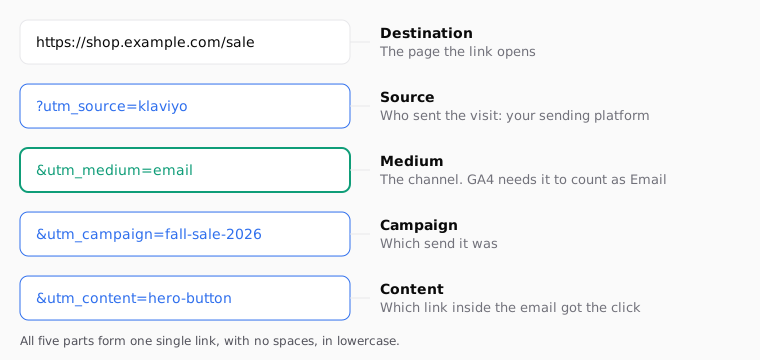
Here is a full link with all of it:
https://shop.example.com/sale?utm_source=klaviyo&utm_medium=email&utm_campaign=fall-sale-2026&utm_content=hero-button
The first parameter starts with ?. Every other one starts with &. If the page URL already has a ?, all UTMs go after it with &.
What should utm_medium be for email?
Write email. That one value decides whether GA4 puts the visit in its Email channel.
GA4 groups traffic into default channels with fixed rules. The rule for Email is simple: the source or the medium must be one of email, e-mail, e_mail or e mail. Google says the channel rules aren't case sensitive and can't be edited. You can check them in the default channel group.
So utm_medium=email lands in Email. utm_medium=newsletter doesn't match the Email rule, so GA4 files it under another channel or under Unassigned. Many teams find half their email traffic in Unassigned for exactly this reason.
| Value of utm_medium | Counted in the Email channel? | What to do |
|---|---|---|
email |
Yes | Keep it |
Email |
Yes, but reports show it apart from email |
Switch to lowercase |
e-mail |
Yes | Fine, but pick one spelling and stick to it |
newsletter |
No | Move it to utm_source or utm_campaign |
crm |
No | Use email, and put the team name somewhere else |
sms |
No, and it shouldn't be | Keep it for SMS links only |
The channel rule ignores case, but the values themselves don't. Google says utm_source=google and utm_source=Google are different values. In the Traffic acquisition report you'd see two rows for the same channel, and you'd have to add them up by hand.
How should you name utm_campaign?
Pick a pattern and write it down. Your campaign names are what you filter by six months from now. If one person writes BlackFriday, another black_friday_2026 and a third bf26, you get three campaigns in the report.
A simple pattern that works for most stores: what it is, plus when it is, in lowercase, joined with hyphens. No spaces, no accents, no capitals.
| Type of send | Example utm_campaign | Why this name |
|---|---|---|
| One-off promotion | fall-sale-2026 |
The year tells it apart from next year's sale |
| Weekly newsletter | newsletter-2026-10-05 |
The date makes each issue unique |
| Welcome flow | welcome-flow |
Flows run for months, so no date |
| Abandoned cart | abandoned-cart |
Same reason: it's always on |
| Product launch | launch-wool-coat |
The product name is what you'll search for |
| Win-back | winback-90-days |
The rule that triggers it, in the name |
For flows, keep the name stable. If you rename the welcome flow every quarter, you can't compare this quarter with the last one. If you need to tell the emails inside a flow apart, use utm_content or utm_term for the step, such as step-2.
If you're still planning which flows to build, the lifecycle levers guide lists the ones most stores need.
How do you know which link got the click?
Use utm_content, with a different value on each link. Google's own example for this parameter is an email with two calls to action, each with its own utm_content.
The other three parameters stay the same on every link of the email. Only utm_content changes.
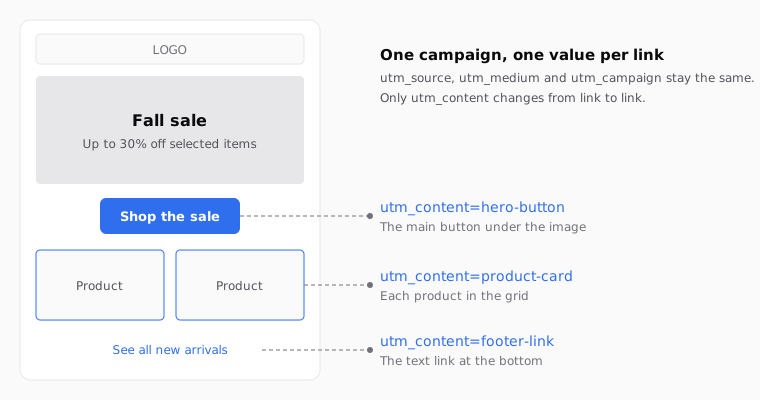
Some naming ideas for the usual parts of an email:
hero-buttonfor the main button under the first image.product-cardfor each product in a grid. If you want each product apart, useproduct-wool-coat,product-scarf.text-linkfor a link inside a paragraph.footer-linkfor the links at the bottom.logofor the logo, if it links to your home page.
In GA4, utm_content shows up as the Session manual ad content dimension. You can add it as a secondary dimension in the Traffic acquisition report, or use it in an exploration. The same page lists Session manual term for utm_term.
You don't need a value on every link. Tag the links you'd actually compare. Two or three values are enough for most emails.
Should your platform add the UTMs, or should you?
Most email platforms can add UTMs to your links for you. Klaviyo, for example, has a setting under Settings > Other > UTM tracking. There you pick the parameters and turn on Automatically add UTM parameters to links. Klaviyo always includes utm_source and utm_medium. Since June 2025, its default for utm_medium is a dynamic value called Message type, which writes email for emails and sms for texts. You can also turn tracking on or off for each campaign and flow message. This is in Klaviyo's UTM tracking guide, checked in October 2026.
That's handy. The risk is doing it twice. If the platform adds UTMs and your links already carry their own, you can end up with clashing values, or with a link that's hard to read when you debug it. Klaviyo's help pages don't say what it does with a link that already has UTMs. So don't count on any behavior. Decide who adds them.
| Who adds the UTMs | Good for | Watch out for |
|---|---|---|
| Your platform, automatically | Teams that want every send tagged without thinking | Values follow the platform's rules, and utm_content per link is harder |
| You, in each link | Teams that want one naming pattern across every tool | Easy to forget a link, so check before you send |
| Both | Nothing | Duplicated or conflicting values |
A middle path many teams use: let the platform handle source, medium and campaign, and add only utm_content by hand on the links you want to compare. If you do that, turn off utm_content in the platform settings, if your platform has it, so they don't fight.
Which UTM mistakes break your reports?
Most UTM problems don't throw an error. The link works, the page opens, and the report is wrong. That's why they last for months.
| Mistake | What you see in GA4 | How to fix it |
|---|---|---|
utm_medium=newsletter |
Email traffic in Unassigned or another channel | Use utm_medium=email |
| Mixing upper and lower case | Two rows for the same campaign | Lowercase everything |
| Spaces in a value | Values with %20 or + in the report |
Use hyphens |
| UTMs on links between pages of your own site | The real source gets replaced by your own labels | Only tag links that come from outside the site |
| An email address in a UTM | Personal data in your analytics | Never put personal data in a UTM; Google Analytics doesn't allow it |
| Platform and links both add UTMs | Clashing values | Pick one place to add them |
| No UTMs at all | Clicks show as referral or direct traffic | Tag at least source, medium and campaign |
The personal data one deserves a word. Platforms let you put merge tags in links, so it's tempting to add the subscriber's email to utm_term. Don't. If you need to match a visit to a person, use your platform's own click tracking or a user ID set by your site.
Before you send, open the test email, click each link, and read the address bar. It takes a minute. If you want to confirm the data arrives, open GA4's Realtime report after you click. The next day, check Traffic acquisition with the Session manual ad content dimension.
How to do it with Remite
Remite has a UTM card in the side panel of the editor, right under Links. It's off by default. This is the real flow.
- Brand. When you set up your brand, you pick your platform, such as Klaviyo or Braze. Remite uses that as the suggested
utm_source. - Links. The Links card lists every link in the email: buttons, linked images, products and links inside text. Fix any link without a target there before you add UTMs.
- Add UTM. Turn on the Add UTM switch on the UTM card. Remite fills in
utm_sourcewith your platform andutm_campaignwith the campaign name, in lowercase with hyphens. You can edit both values. - More parameters. Click + utm_medium, + utm_content or + utm_term to add them. When you add
utm_medium, Remite suggestsemail. Remove any parameter with the × next to it. - Export. When you click Export, Remite adds the parameters to every link that doesn't already have them. It doesn't change parameters a link already carries. It skips
mailto:links and any link built with a platform tag, such as the unsubscribe link. - Send to your platform. From the export window you can download the HTML in your platform's syntax, or use Send to for Klaviyo, Braze, Iterable, Salesforce or Brevo (beta for all but Brevo). The UTMs travel inside the links.
A few limits, so you know what to expect. The UTM card applies the same values to every link. To get a different utm_content per button, write it into that link's URL in the Links card, for example https://shop.example.com/sale?utm_content=hero-button. Since Remite doesn't overwrite parameters a link already has, that value stays, and the rest are added around it. UTMs are added on export, so Send me a test shows the links without them. And if your platform also adds UTMs automatically, turn that off for this email, or leave Remite's switch off.
For the other tags you'll write in the same links, see the first name and unsubscribe cheat sheet for 21 platforms. If you send from Klaviyo, the Klaviyo default value guide covers fallbacks for empty fields. The lifecycle page explains which emails to measure first. An automatic lifecycle diagnosis is coming soon.
Frequently asked questions
What UTM parameters should I use for email?
Use utm_source, utm_medium and utm_campaign on every link. Add utm_content with a different value per link if you want to know which one got the click.
What should utm_medium be for email campaigns?
Use email, in lowercase. GA4's Email channel matches email, e-mail, e_mail or e mail in the source or medium, so values like newsletter fall outside it.
What is the difference between utm_source and utm_medium in email?
The medium is the channel, which for email is always email. The source is who sent it: your platform, such as klaviyo, or a specific list, such as newsletter.
Are UTM parameters case sensitive?
The values are. Google says utm_source=google and utm_source=Google are different values, so they show as separate rows. The channel rules in GA4 ignore case, but your reports won't.
Does Klaviyo add UTM parameters automatically?
It can. Go to Settings > Other > UTM tracking and turn on Automatically add UTM parameters to links. You can also turn tracking on or off per campaign and per flow message.
Should I put UTMs on the unsubscribe link?
No. The unsubscribe link goes to your platform, not to your site, so there's nothing to measure in Analytics. Remite leaves it alone on purpose because it is built with a platform tag.
Can I use merge tags inside a UTM value?
Most platforms allow it, and it can work for things like the campaign name. Never use it to put an email address or other personal data in a UTM, because that data ends up in your analytics.
Where do I see utm_content in GA4?
It appears as Session manual ad content. Add it as a secondary dimension in the Traffic acquisition report, or use it in an exploration.
If you want UTMs, links and platform syntax handled in one place when you build each email, you can join the Remite waitlist.