Free shipping threshold email: who gets it, when, and what to add
How to build a free shipping threshold email: who to send it to, when, which products close the gap, and how to calculate the amount left in Klaviyo.
Quick answer
A free shipping threshold email goes to people who leave a cart below your free shipping minimum. It tells them how much is left, suggests one or two low-priced products that close the gap, and links straight back to the cart. Send it one to four hours after the cart is abandoned, as the first email of the cart flow you already run. In Klaviyo you can work out the amount from the event value with {{ event|lookup:'$value'|floatsub:50|abs|floatformat:2 }}, always inside a condition that checks the cart is under 50.
What you'll find
- Who gets this email and when
- Which products to suggest
- How to calculate the amount left in Klaviyo
- What the email looks like inside
- The mistakes that break it
- How to do it with Remite
What is a free shipping threshold email?
It's a cart reminder with one extra fact: the money left before shipping becomes free. Say your store ships free over $50. Someone leaves a $38 cart. The email tells them they're $12 away and shows them something that costs about that.
It works because shipping is a cost nobody wants to pay. Many shoppers would rather spend $12 on something useful than $5.95 on postage. The email simply makes that trade visible.
It fits best in stores where the best seller costs less than the threshold. If nearly every order already clears it, this email has little to do. It's one of the levers in the guide to lifecycle levers for online stores, and the one closest to revenue.
Before you write anything, check two things in your store:
- Where the threshold lives. In Shopify, free shipping is set in Settings > Shipping and delivery, inside a shipping zone. When you add the rate you choose the Order amount rate type and the Offer free shipping option with a minimum amount. The Shopify help page on shipping rates walks through it.
- Whether the threshold is the same in every zone. If Canada or Hawaii has a different minimum, the email has to know. Otherwise it promises something the store won't honor.
Who should get this email, and when?
People with a cart below the threshold who haven't bought. Nobody else. If the cart is already over the threshold, the message changes: "your order already ships free". That's a good reason to come back too, but it's a different email.
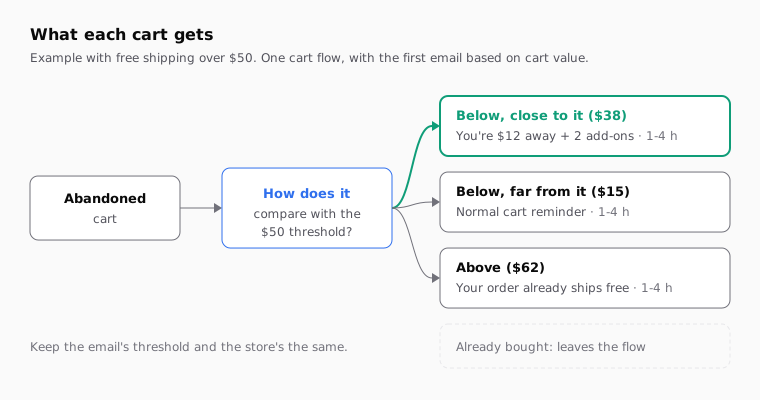
The simplest setup is not to build a new flow. Use the abandoned cart flow you already have and change the first email based on cart value. That way nobody gets two emails about the same cart.
| Cart situation | What you tell them | When |
|---|---|---|
| Below the threshold, close to it (up to 30% short) | How much is left, plus one or two add-ons that cover it | First email in the flow, 1 to 4 hours after |
| Below the threshold, far from it | A normal cart reminder; free shipping as a small note | First email in the flow |
| Above the threshold | Their order already ships free | First email in the flow |
| Already purchased | Nothing from this flow; the exit condition removes them | Not sent |
| Second reminder, still no order | The cart again, without repeating the shipping math | 20 to 24 hours after |
The 30% in the table is a starting point, not a rule. If someone is $35 short of $50, a $35 add-on isn't a nudge anymore. It's a second purchase. In that case, a line about free shipping is enough.
The exit matters as much as the entry. If the person buys between abandoning and the send, the email shouldn't go out. Check that your cart flow has that condition before you change anything.
Which products should I suggest to close the gap?
Products that cost what's missing or a little more, and that make sense next to what's already in the cart. The worst suggestion is more of the same. Someone buying running shoes doesn't want a second pair.
Think about what people pick up on the way out. Every store has its own.
| Add-on type | Example in a clothing store | Example in a skincare store | Why it works |
|---|---|---|---|
| Consumable for the product | Performance socks | Serum refill | They'll need it anyway |
| Care for the product | Waterproofing spray | Travel pouch | Protects what they chose |
| Small size or format | Knit beanie | Travel size | Low price, low risk |
| Cheap best seller | Basic tee | Lip balm | Already proven to sell |
| Low-value gift card | $15 gift card | $15 gift card | Closes any gap |
A gift card closes any gap, but check first whether it counts toward your threshold. In many stores it doesn't, or shouldn't.
Three rules for picking them:
- They're in stock. A sold-out add-on breaks the whole email.
- The price closes the gap. If they're $12 short, a $9 product doesn't help. They'd still be short.
- Two, three at most. More options make people compare instead of buy.
If your platform has catalog recommendations, you can pick them based on the cart. If not, a fixed list of cheap add-ons is a fine start. Refresh it each season.
How do I calculate the amount left in Klaviyo?
With the value of the event that triggers the flow and two math filters. On the started checkout event, $value holds the total. Because the name starts with $, you can't write it with a dot. You read it with the lookup filter.
This block, with a $50 threshold, goes in a text block in the email:
{% if event|lookup:'$value' < 50 %}
You're ${{ event|lookup:'$value'|floatsub:50|abs|floatformat:2 }} away from free shipping.
{% else %}
Your order already ships free.
{% endif %}
What each piece does:
| Piece | What it does | With a $38 cart |
|---|---|---|
event|lookup:'$value' |
Reads the cart total from the event | 38 |
floatsub:50 |
Subtracts the threshold | -12 |
abs |
Drops the minus sign | 12 |
floatformat:2 |
Keeps two decimals | 12.00 |
if ... < 50 |
Only shows the math when the cart is short | True |
The subtraction runs backwards on purpose. The filter subtracts its argument from the value, and there's no documented way to subtract an event value from a fixed number. So you subtract the other way and drop the sign. Since the condition guarantees the cart is under 50, the result is always the amount left.
Four things to check before you turn it on:
- What
$valueincludes. Compare it in the preview against a real event. If your threshold counts discounts or excludes tax and$valuedoesn't, the math won't match. - The output format. The result prints like 12.00. Look at it in the preview and make sure it reads well next to your currency sign.
- A missing value.
floatsubreturns an empty string if anything goes wrong. Preview a profile with no cart to see what shows up. - One threshold, one place. If free shipping moves to $60, you have to change the 50 on both lines.
The floatsub, abs and floatformat filters are in Klaviyo's glossary of variable filters, and operators like < are in its guide to conditionals in messages. Checked against Klaviyo's documentation in October 2026.
If the email also uses a first name, give it a fallback so it never says "Hi ,". The guide to Klaviyo's default value for first name covers it.
What goes in the email, from top to bottom?
Not much. The shopper already knows what they wanted. The email reminds them of the cart, gives them the number, and makes finishing easy.
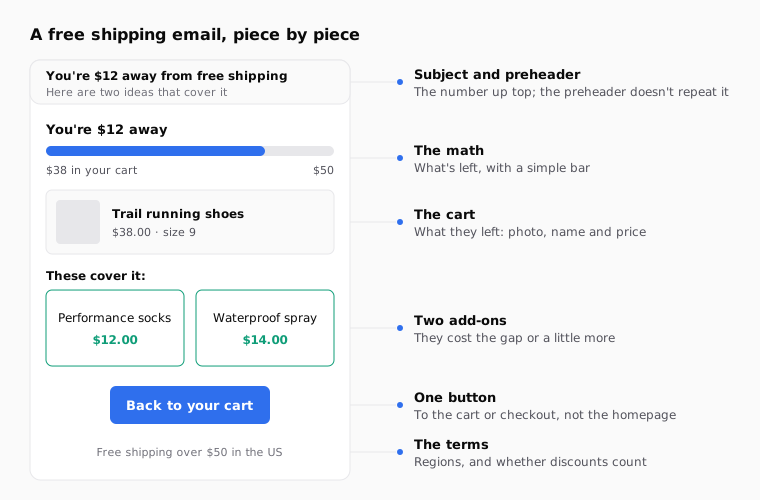
- A subject line with the number. For example: "You're $12 away from free shipping". If your platform can't put the amount in the subject, use a general one: "Your cart is one step from free shipping".
- A preheader that finishes the thought. "Here are two ideas that cover it." Don't repeat the subject.
- The math, at the top. One line with what's left. A progress bar helps people see it at a glance, but keep it a simple image or table, not something that relies on code some email clients won't render.
- The cart. The products they left, with photo, name and price.
- Two add-ons. Prices visible, so it's clear they close the gap.
- One button. To the cart or checkout, not the homepage.
- The fine print. Free shipping terms in one sentence: which regions, and whether discounts count.
Track clicks on the add-ons separately from the cart button. That tells you whether the email sells through the reminder or through the suggestion. The guide to UTM parameters for email campaigns shows how to use utm_content to tell each link apart.
What mistakes break this email?
Almost all of them come from the same place: the email says something the store doesn't do.
| Mistake | What the shopper sees | How to avoid it |
|---|---|---|
| The email's threshold doesn't match the store's | They fill the cart and still pay for shipping | One threshold, checked against your shipping settings |
| They're close, but the add-on costs less than the gap | They add it and still don't get free shipping | Pick add-ons that cost the gap or more |
| Sold-out add-on | They click and can't buy it | Use high-stock products or stock-aware recommendations |
| The button goes to the homepage | They have to find their cart again | Link to the cart or checkout |
| Sent to someone who already bought | An email that makes no sense | Flow exit condition on placed order |
| Math on an empty value | "You're $ away from free shipping" | Preview a profile with no cart and tighten the condition |
| Repeated in every reminder | It feels like being chased | The math only in the first email |
Test an edge case too: a cart sitting exactly at $50. With < 50, that cart falls into "already ships free". If your store requires going over $50, change the condition.
And if you want to know which subject line works better, the one with the amount or the general one, test them against each other. The guide to subject line A/B tests in Klaviyo and Braze shows where to set it up.
How to do it with Remite
Remite builds the email with your brand and your products, and gets it ready for your platform. Here's the real flow.
- Brand. Paste your store's address. Remite pulls the colors, logo, fonts and style.
- Brief. Describe the email: "Abandoned cart under the $50 free shipping threshold; remind them what's left and suggest two cheap add-ons." In the Antes de generar step, Remite reviews the brief and asks about anything missing, such as the threshold or the regions.
- Products. Remite reads products, prices and photos from your site. Ask in the chat for the add-ons you want, for example "use the $12 refill and the $14 socks".
- The real cart. On the product block, open Connect your data and choose From the cart or event that triggers the email. With Klaviyo, under Your store you pick Shopify or your own integration, and Remite fills in the name, price, image and link fields. The preview keeps showing the sample products.
- Tweaks. Click the text to change it, ask for changes in the chat, or use Comment on the part you want to adjust.
- Subject and links. The Subject line card holds the subject line, the preheader and, if you want it, the A/B test. In Links you check that the button goes to the cart, and the UTM card adds tags to every link.
- Test and hand-off. Send me a test puts it in your inbox. Then Export gives you the HTML in your platform's syntax, or Enviar a (send to) creates the template in Klaviyo, Braze, Iterable, Salesforce or Brevo; all in beta except Brevo.
Remite doesn't calculate the amount left in each cart. Your platform does that at send time. You add the line with the math in Klaviyo using the block above, where the text says what's left. Automatic lifecycle diagnosis, which will look at your store and tell you whether this lever fits, is coming soon. Until then, the lifecycle page explains each lever.
Frequently asked questions
When should I send the free shipping threshold email?
One to four hours after the cart is abandoned. It's the first email of your abandoned cart flow, not a separate one.
Who shouldn't get it?
People who already bought and people already over the threshold. The flow's exit condition removes the first group. The second group is better served by a note that their order already ships free.
Can I put the amount left in the subject line?
It depends on the platform and whether the subject accepts event variables. If you're not sure, use a general subject and put the number at the top of the email.
How do I calculate the amount left in Klaviyo?
Use {{ event|lookup:'$value'|floatsub:50|abs|floatformat:2 }} inside {% if event|lookup:'$value' < 50 %}. Replace 50 with your threshold and check in the preview that $value includes the same things your store counts.
Which products should I suggest to complete the order?
Two cheap add-ons that cost the gap or a little more and make sense with the cart. Consumables and accessories beat a second copy of what's already there.
Is it worth it if most orders already clear the threshold?
Not much. This email wins when lots of carts stall just under the threshold. If most clear it, use free shipping as a selling point in your normal reminder.
Does Remite calculate what's left in each cart?
No. Remite builds the email with your brand, your products and the cart items, and exports it for your platform. Your platform does the math at send time, with a block like the one in this guide.
If you want to put this email together with your brand and products in one sitting, you can join the Remite waitlist.