Subject line A/B test in Klaviyo and Braze: where to set it up
Subject line A/B test in Klaviyo and Braze: where the button is in each, which winning metric to pick, how big the test should be and how to write two variants.
Quick answer
In Klaviyo, you set up a subject line A/B test inside the campaign: write the subject line and click Create A/B test, above the subject line field. Klaviyo creates an identical second variation, you change its subject line, and you pick the winning metric, the test size and how long it runs. In Braze, you use variants: in a single-channel campaign you click Add Variant, change only the subject line and split the audience between variants. Test one difference at a time, and don't call a winner until the platform says the result is reliable.
What you'll find here
- Where to set up the subject test in Klaviyo
- Where to set it up in Braze
- How the two compare, in one table
- Which metric should pick the winner
- How to write two subject lines worth comparing
- When to trust the result
- How to do it with Remite
How do you A/B test a subject line in Klaviyo?
In Klaviyo, the test lives inside the campaign itself. You don't need two campaigns.
- Go to Campaigns and click Create campaign.
- Name it, choose Email and click Continue.
- Pick your lists or segments and click Next.
- Write the subject line, preview text and sender details.
- Build the email content.
- Click Create A/B test, above the subject line field.
Klaviyo creates an identical second variation. Give each one a name that says what changes, like "With name", and edit only the subject line of variation B. Paid accounts also get Generate a variation to A/B test, which suggests a subject line variation for you.
Then you decide three things:
- Winning metric. Klaviyo offers Open rate, Click rate and Placed order rate. For subject lines it recommends open rate.
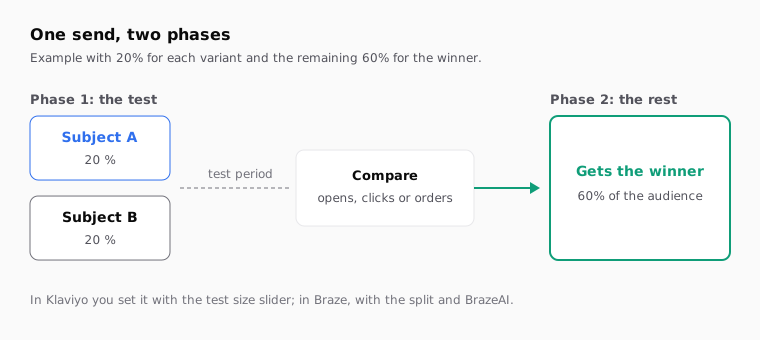
- Test size. Set with a slider. For example, 20% get variation A and another 20% get variation B.
- Duration. You can only adjust it when the test is under 100%. When it ends, Klaviyo sends the winning variation to everyone else.
Klaviyo recommends testing only two variations.
Flow emails can be tested too: open the email in the flow and click Create A/B test. In flows, Klaviyo uses click rate by default, and you can switch it to open rate.
Checked against Klaviyo's documentation in October 2026: how to A/B test an email campaign.
How do you A/B test a subject line in Braze?
In Braze, you build the test with message variants. Each variant is a full email, and you make sure only the subject line differs.
- Go to Messaging, then Campaigns.
- Click Create campaign and choose a single-channel campaign, here Email.
- Compose the first variant with its subject line.
- Click Add Variant to create the second one. Braze allows up to eight variants.
- In the second variant, change only the subject line. If you also change the body, you won't know what caused the difference.
- Schedule the campaign: scheduled, action-based or API-triggered.
- In the audience step, split the percentage between variants and, if you want, a control group.
- To have Braze send the winner to the rest, turn on Optimize with BrazeAI™.
With that option on a single-send campaign, Braze first sends a portion of the audience to each variant. When the experiment ends, it sends the best performer to everyone else. The experiment runs 4, 24 or 72 hours, or a custom length. For email, the default metric is unique clicks.
Two warnings from the documentation. Don't edit the campaign once the test has started, or in the hour before launch. And variants only exist in campaigns: in Canvas you use Experiment Paths instead.
Checked against Braze's documentation in October 2026: create A/B and multivariate tests.
If your subject line uses the first name or another attribute, check how each one is written in the Braze custom attribute Liquid guide.
How do Klaviyo and Braze differ for subject line tests?
The idea is the same. What changes is where things live and what the platform decides for you.
| What | Klaviyo | Braze |
|---|---|---|
| Where you create it | Create A/B test button above the subject line | Add Variant button in the campaign |
| What a variation is | The same email with a different subject, sender or content | A full message; you decide what changes |
| How many versions | Recommends two | Up to eight |
| Winning metrics | Open rate, Click rate, Placed order rate | Unique opens, clicks or primary conversion event |
| Sends winner to the rest | Yes, when the test period ends | Yes, with Optimize with BrazeAI™ |
| Control group | Not part of the campaign test guide | Optional |
| In automations | Yes, in flow emails | Not with variants; Canvas uses Experiment Paths |
One detail about Braze's control group: the documentation advises against it when the winner is decided by opens or clicks. People in the control group get nothing, so their open rate is zero by definition. A control group makes sense when you measure a purchase.
Which metric should pick the winning subject line?
The subject line mostly decides whether someone opens. That's why Klaviyo recommends open rate for these tests. But open rate has a catch.
Apple Mail has a feature called Protect Mail Activity. With it on, remote content is downloaded privately in the background when a message arrives, not when the person views it. Apple explains it in its Mail Privacy Protection help page. The tracking pixel can load even if nobody read the email. If much of your list uses Apple Mail, both variants get inflated opens, and the gap between them gets harder to see.
| Metric | When to use it | Its weak spot |
|---|---|---|
| Open rate | Subject, preview text or sender tests on large lists | Automatic opens inflate it |
| Click rate | When the subject promises something specific inside the email | Also depends on the content and buttons |
| Orders or conversion | High-volume sends with a clear sales goal | Needs far more people to reach a reliable result |
If your list is large, use open rate and also check each variant's clicks. If one subject line wins on opens and loses on clicks, it may have promised something the email didn't deliver. If your list is small, run the same kind of test across several sends and see if the pattern holds.
How do you write two subject lines worth comparing?
Change one thing. If A is short with the first name, and B is long with an emoji, you'll know which won but not why. And the why is what you reuse next time.
Write down what you expect and why before sending. For example: "The price one wins because this list buys on price."
| What you test | Variant A | Variant B |
|---|---|---|
| First name | Sam, your size is back in stock | Your size is back in stock |
| Question or statement | Got a coat for November yet? | Wool coats for November |
| Price up front | New coat collection | Wool coats from $89 |
| Real urgency | Fall sale across the store | Fall sale: ends Sunday |
| Length | Fall sale | Fall sale: up to 30% off coats and knitwear |
Four things to watch:
- Preview text goes with both. If subject B changes the angle, check that the preview text still fits it.
- Urgency has to be true. If you write "ends Sunday", it has to end Sunday.
- First names need a fallback. A subject line with the first name breaks when the profile doesn't have one. In Klaviyo you add a default value, like
{{ first_name|default:'…' }}. The Klaviyo first name default value guide covers it. - Put the key words first. Many phones cut subject lines short.
A trick that makes the line work with or without a name in Klaviyo: make the fallback a greeting.
{{ first_name|default:'Hi' }}, your size is back in stock
With a name you get "Sam, your size is back in stock". Without one, "Hi, your size is back in stock".
When can you trust the result?
When the platform says so. A subject line can lead after an hour and lose by the end of the day.
Klaviyo labels each campaign test. It's Statistically significant when at least 50 people received each variation and the win probability is at least 90%. Between 75% and 89% it counts as promising and suggests rerunning the test. Below that, depending on test size, it's marked not statistically significant or inconclusive. The details are in its statistical significance guide.
Braze compares all variants against each other and calls the best of those above a 95% confidence level the winner. Its documentation gives a rough size: around 15,000 users per variant, control included, to reach that 95%. It's clear that this depends on the case.
| What you see | What it means | What to do |
|---|---|---|
| One variant wins with a reliable result | The difference will likely repeat | Apply the idea to your next sends |
| It wins narrowly without a reliable result | It may be chance | Run the same kind of test on another send |
| It wins on opens and loses on clicks | The subject promised more than the email gave | Adjust the subject or content and test again |
| Several tests in a row end in a tie | Your list doesn't care about that difference | Test something else |
| The test reached very few people | Not enough data to decide | Make the test bigger or pool several sends |
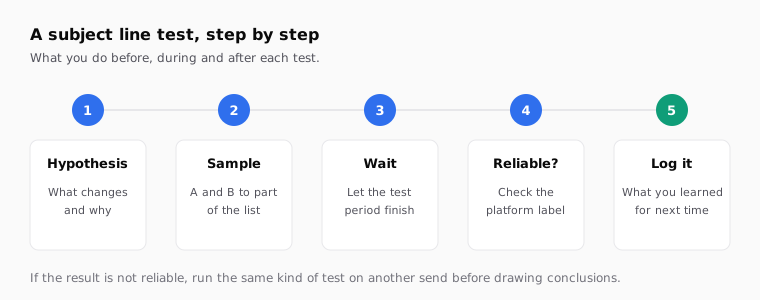
Log every test in a sheet: date, segment, variants, metric, winner and whether it was reliable. In a few months you'll know what works with your audience.
How to do it with Remite
Remite writes both subject line variants along with the email. You still run the test in your platform, which splits the audience and measures. Here's the real flow.
- Brief. Describe the campaign. In the Antes de generar step, Remite reviews the brief and asks questions if something is missing. When it generates, it suggests several subject lines, each with its B variant, plus preview text.
- Subject line. The Subject line card in the side panel shows the chosen subject. More options shows the others it suggested, and Generate others asks for two new ones, each with its B variant.
- A/B test. Turn on the A/B test switch on the card. A and B appear, and you can edit both by clicking the text. You can also ask in the chat, like "make B shorter and drop the name".
- Preview text. It's on the same card. Remite flags it if it's missing, over 90 characters, or repeats the subject.
- Test send. Send me a test sends the email to your inbox with sample data.
- Export. When you export, the campaign text file lists variant A and variant B in your platform's syntax, with the name and its fallbacks, plus a line saying where to set up the test: in Klaviyo, Create A/B test inside the campaign; in Braze, one variant per subject line.
- Send to your platform. With the test on, Enviar a (send to) creates two templates in your account, "· A" and "· B", which differ only in the subject line. It works with Klaviyo, Braze, Iterable, Salesforce and Brevo; all in beta except Brevo. In Klaviyo, the subject and preview text are set when you create the campaign, so copy them from the exported file.
Remite doesn't pick the winner or read your results: your platform does that. Automatic lifecycle diagnosis, which will look at your sends and tell you what's missing, is coming soon.
If you send in several languages, both subject variants are written in each language. The multilingual email template guide explains how. To separate each variant's visits in Analytics, the UTM parameters for email guide shows how to use utm_term for that. The lifecycle page covers which sends are worth testing first.
Frequently asked questions
Where is the subject line A/B test in Klaviyo?
Inside the campaign, above the subject line field. Click Create A/B test and Klaviyo creates a second variation for you to change its subject line.
Can you A/B test subject lines in Braze?
Yes, with variants. In a single-channel campaign click Add Variant, change only the subject line in the new variant and split the audience between the two.
Which metric should I use for a subject line test?
Klaviyo recommends open rate. If much of your list uses Apple Mail, automatic opens inflate it, so check clicks too before trusting the result.
How long should the test run before picking a winner?
Long enough for most of the sample to have had a chance to open. In Braze you choose 4, 24 or 72 hours or a custom length; in Klaviyo you adjust it when the test isn't sent to 100%.
Can I A/B test a subject line in a flow or a Canvas?
In Klaviyo, yes: open the flow email and click Create A/B test. In Braze, A/B variants belong to campaigns; in Canvas you use Experiment Paths.
How many subject line variants should I test at once?
Two, unless your list is very large. Klaviyo recommends two. Braze allows up to eight, but each extra variant splits the audience further and takes longer to give a reliable result.
Does Remite run the A/B test for me?
No. Remite writes both subject line variants, tells you where to set up the test in your platform and can create the A and B templates in your account. Your platform handles the split and picks the winner.
If you'd like to prepare the subject line, its B variant and the on-brand email in one place, you can join the Remite waitlist.