Replenishment email timing: when to send it for each product
Replenishment email timing explained: how to pick the send day from how long a product lasts, how many reminders to send, and how to set it up in Klaviyo.
Quick answer
Send the replenishment email a few days before the product runs out, not on the day it runs out. Work out how many days one unit lasts and subtract a buffer of five to seven days. That's the day of the first reminder, counted from the order. Send a second one when the product should be gone and, if you want, a third later with an incentive. Then adjust the days using how long your customers actually take to reorder.
What you'll find
- Which products need this email
- How to work out the day of the first reminder
- How to tune the days with your real orders
- How many reminders to send, and when
- How to set it up in Klaviyo
- How to do it with Remite
Which products need a replenishment email?
Products that get used up. Coffee, pet food, contact lenses, serum, capsules, filters, supplements, diapers. Things the customer will buy again for sure. The only question is whether they buy them from you or from the grocery store.
The replenishment email shows up right when that question comes up. It reminds them they're about to run out and puts the same product, in the same size, one click away. It's one of the levers in the guide to lifecycle levers for online stores, and one of the lightest on creative work once it's running.
A jacket, a sofa or a phone doesn't get replenished. For those products, a general repeat-purchase or cross-sell email works better.
| Product type | Replenishment email? | Why |
|---|---|---|
| Fixed-dose consumable (capsules, pet food, contact lenses) | Yes, the ideal case | You can work out how long it lasts almost exactly |
| Variable-use consumable (shampoo, serum, coffee beans) | Yes, with a wider buffer | Each person uses it at a different pace |
| Refill for a device (filters, brush heads, cartridges) | Yes | The manufacturer usually says how often to change it |
| Seasonal product (sunscreen, fertilizer) | Sometimes | The date matters more than the usage |
| Durable product (clothing, furniture, electronics) | No | It doesn't run out; people replace it when they want |
If most of your catalog sits in the last row, this email isn't your priority.
How do I work out the day of the first reminder?
With three numbers: how long the product lasts, how long shipping takes, and a buffer. That's all you need to start.
- How long one unit lasts. A bottle of 60 capsules at two a day lasts 30 days. A 2 lb bag of coffee, at two cups a day with about half an ounce each, lasts roughly a month.
- How long your shipping takes. Your usual time, not your fastest. If you normally deliver in three days, use three.
- A buffer. Five to seven days. That's the time it takes the customer to open the email, decide and order, plus some slack.
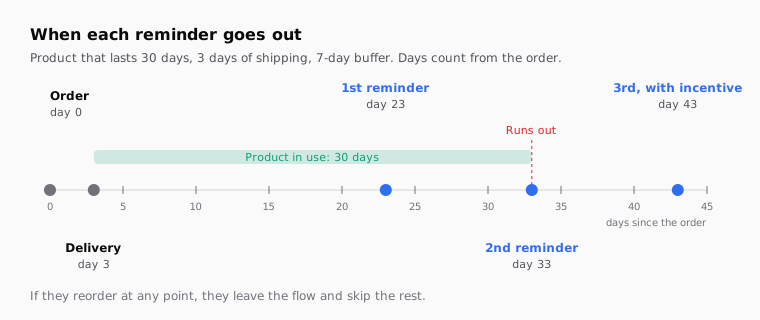
Almost every platform, Klaviyo included, counts days from the order, not from delivery. That makes the math simpler. The first package takes as long to arrive as the next one will, so the two shipping times cancel out:
runs out on day     = shipping days + days it lasts
reorder by day      = runs out − shipping days − buffer
                    = days it lasts − buffer

Example: lasts 30 days, 3 days shipping, 7 days buffer
runs out on day 33; first reminder on day 23
Shipping only enters the math if the reorder ships slower than the first order. That can happen when the first order goes out from a nearby warehouse and the reorder doesn't. In that case, subtract the difference.
Watch the quantity. If someone buys two bottles, they last twice as long. The simplest option is to split the flow by quantity. If that gets too complicated, send the reminder for a single unit and let the exit condition handle the rest.
How do I tune the days with my real orders?
Look at how long your customers actually take to reorder the same product. The formula is an estimate. Your orders are the data.
Export your orders from the last six to twelve months with date, customer and product. For every customer who bought the same product twice, count the days between the first and second purchase. Sort those numbers and take the median, the middle value. The median works better than the average because it doesn't get dragged around by the one person who came back a year later.
| What you see in your orders | What it means | What you change |
|---|---|---|
| The median is close to your estimate | Your usage estimate is good | Nothing; leave the flow as it is |
| The median is quite a bit longer | People use it more slowly, or buy elsewhere | Push the first reminder back a few days |
| The median is shorter | People use it faster, or buy more than one | Bring the first reminder forward |
| The days vary wildly between customers | Usage depends a lot on the person | Use two reminders spaced further apart |
| Almost nobody buys the product twice | It may not be a consumable for your customers | Check whether this flow makes sense for it |
Five repeat buyers won't tell you much. A few dozen is enough to start adjusting. If you don't have that yet, stick with the formula and revisit it in a few months.
Klaviyo also predicts an expected date of next order for each customer, as part of its predictive analytics. It only works if your account meets some minimums: at least 500 customers with orders, 180 days of order history, orders in the last 30 days, and some customers with three or more orders. The details are in Klaviyo's guide to predictive analytics. Klaviyo itself advises against counting down to that date, because repeat customers would get the same sequence before every order. Use it to segment or to sanity-check your days, not as your only clock.
How many reminders should I send, and when?
Two or three. More than that gets annoying, and most people who were going to come back already have.
| Reminder | When, for a 30-day product | What it says | Incentive |
|---|---|---|---|
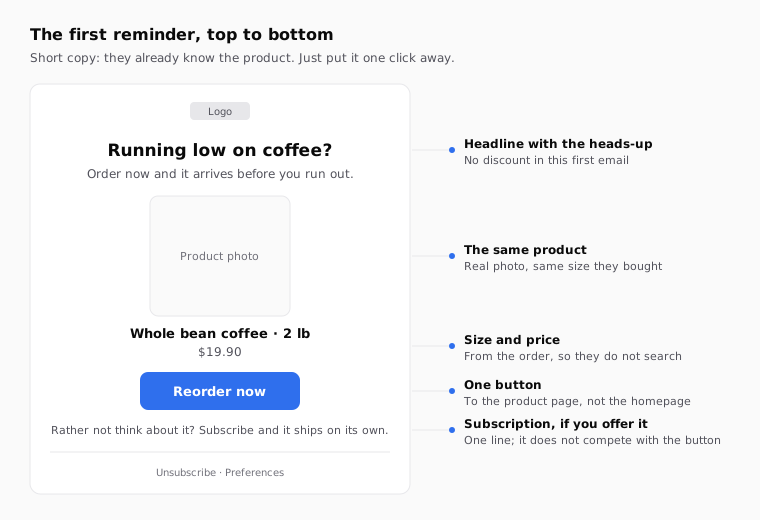
| First | Day 23 (a few days before it runs out) | "Running low?" and the same product with a button | No |
| Second | Day 33 (when it runs out) | "Out already?" and the product again | No, or free shipping if you already offer it |
| Third, optional | Day 43 (ten days later) | Short reminder with a reason to come back | Yes, if your margin allows it |
Klaviyo's guide to creating a replenishment flow suggests the same pattern: two reminders, then one follow-up with an incentive once the buying cycle has passed. Checked against the Klaviyo documentation in October 2026.
A discount in the first email is a common mistake. That customer was going to buy anyway. If you hand out 10% every time, they learn to wait for the code. Save it for the end, for the people who haven't come back.
Each email should only go out if the customer hasn't reordered. That check runs before every send, not just when they enter the flow. If they buy on day 25, they shouldn't get the day 33 email.
How do I set it up in Klaviyo?
With a flow triggered by the order, a product filter, time delays and a check before each email. These are the steps the Klaviyo documentation describes.
- Trigger. Create a metric-triggered flow on the Placed Order event. If you use Shopify or BigCommerce, there's a prebuilt replenishment flow under Flows > Create Flow, in the Encourage repeat purchases goal.
- Trigger filter. If the flow is for one product, add a filter like Items contains with the product name. Only people who bought it get in.
- Delays. Add a Time Delay right after the trigger, set to the day of the first reminder. Then another delay between each email.
- Profile filter. Add Placed Order zero times since starting this flow. For a single-product flow, limit that filter to orders that contain the product. Klaviyo checks this filter before every send.
- Content. Show the product they bought, with its photo and link. You can add a product block with add-ons.
One flow per product or product family is the clearest setup. If you have lots of products that last different lengths of time, group them by duration: one flow for 30-day products, another for 60, another for 90. That way you don't maintain fifty flows.
| How long it lasts | First reminder | Second | Third |
|---|---|---|---|
| 15 days | Day 10 | Day 18 | Day 25 |
| 30 days | Day 23 | Day 33 | Day 43 |
| 60 days | Day 53 | Day 63 | Day 75 |
| 90 days | Day 83 | Day 93 | Day 105 |
The table assumes three days of shipping, a five-day buffer for the 15-day product and seven days for the rest. Change it to match your shipping and your real orders. On other platforms, such as Braze or Iterable, the logic is the same: a purchase trigger, a delay, a product filter and an exit if they buy again. Only the button names change.
If you greet people by name, add a fallback so it never says "Hi ,". The guide to Klaviyo's default value for first name covers it.
What mistakes break a replenishment email?
Almost all of them come down to timing, or to emailing someone who doesn't need it.
| Mistake | What happens | How to avoid it |
|---|---|---|
| First reminder on the day it runs out | The new one arrives late and they buy elsewhere | Subtract a five to seven-day buffer from how long it lasts |
| No exit condition | People who already reordered get "running low?" | Order filter since entering the flow, checked before every email |
| Ignoring quantity | Someone who bought three bottles gets the reminder after a month | Split flows by quantity, or longer delays for big orders |
| Discount in the first email | Customers learn to wait for the code | Incentive only in the last reminder |
| Link to the homepage | They have to search for the product again | Link straight to the product page or a cart with it |
| Sending it to subscribers | They get a reminder for something that ships on its own | Exclude people with an active subscription |
| One flow for the whole catalog | Coffee and a 30 lb bag of dog food get the same day | Group products by how long they last |
Track each reminder on its own. That tells you whether the second and third add sales or just add fatigue. The guide to UTM parameters for email campaigns explains how to tell each email apart with utm_content. And if you're torn between two subject lines, such as "Running low on coffee?" and "Ready for a refill?", test them with the subject line A/B test guide for Klaviyo and Braze.
How to do it with Remite
Remite builds the email with your brand and the real product, and gets it ready for your platform. You decide when it sends in your flow; Remite prepares what gets sent. Here's the real flow.
- Brand. Paste your store's address. Remite pulls the colors, logo, fonts and style.
- Brief. Describe the email: "First replenishment reminder for the 2 lb whole bean coffee, a few days before it runs out; button to reorder." In the Antes de generar step, Remite reviews the brief and asks about anything missing, such as the tone or whether there's a subscription option.
- Product. Remite reads products, prices and photos from your site. Ask in the chat for the exact product and size.
- The product from the order. On the product block, open Connect your data and choose From the cart or event that triggers the email. Remite fills in the name, price, image and link fields from the event. The preview keeps showing the sample products.
- The three emails. Ask for the variants in the chat: "Make the second reminder, shorter," "Make the third with 10% off and the code COMEBACK10." Adjust anything by clicking the text or using Comment.
- Subject and links. The Subject line card holds the subject line, the preheader and the A/B test. In Links you check that the button goes to the product page, and the UTM card tags every link.
- Test and hand-off. Send me a test puts it in your inbox. Then Export gives you the HTML in your platform's syntax, or Enviar a (send to) creates the template in Klaviyo, Braze, Iterable, Salesforce or Brevo; all in beta except Brevo.
You set the delays and the exit condition in your platform's flow. Automatic lifecycle diagnosis, which will look at your store and tell you which levers you're missing, is coming soon. Until then, the lifecycle page explains each lever.
Frequently asked questions
When should I send a replenishment email?
A few days before the product runs out. Work out how many days it lasts and subtract a buffer of five to seven days, counting from the order.
How many replenishment emails should I send?
Two, plus an optional third. The first before it runs out, the second when it runs out, and the third, with an incentive, after that.
Should the replenishment email include a discount?
Not the first one. That customer was going to buy anyway. If you want an incentive, put it in the last reminder for people who still haven't come back.
How do I know how long my product lasts?
Start with the dose or normal usage: units in the pack divided by daily use. Then compare it with the median number of days between the first and second purchase of the same product in your orders.
What if the customer buys several units?
It lasts longer, so the reminder should arrive later. You can split the flow by quantity or use a longer delay for larger orders.
How do I stop it going to people who already reordered?
With a condition that's checked before every email. In Klaviyo it's the Placed Order zero times since starting this flow filter, limited to the product if the flow covers just one.
Can I use Klaviyo's expected date of next order?
Yes, if your account meets the predictive analytics minimums. Use it to segment or check your days; Klaviyo advises against counting down to that date.
Does Remite decide when each email goes out?
No. Remite builds the emails with your brand and the product from the order, and exports or sends them to your platform. The days and conditions live in your flow.
If you want to build your replenishment emails with your brand and your products in a few minutes, you can join the Remite waitlist.