Browse abandonment email: what to include and when to send it
Browse abandonment email guide: what to put in it, when to send it, how many to send, and how to set the flow and product tags in Klaviyo without mistakes.
Quick answer
A browse abandonment email goes to someone who looked at a product and left without adding it to the cart. Keep it short: a light headline, the exact product they viewed with its photo and price, one button to the product page, and one line that answers a common doubt, such as returns or sizing. Send the first one a few hours after the visit, never before one hour, and stop the flow if they add to cart, start checkout or buy. One or two emails are enough, usually without a discount.
What you'll find
- Who gets a browse abandonment email
- What to put in the email
- When to send it
- How many emails, and what each one says
- How to set it up in Klaviyo
- How to do it with Remite
Who gets a browse abandonment email?
Someone your store already knows who viewed a product and didn't go further. The key word is "knows". Your email platform can only link a visit to a person if that browser has been identified before.
In Klaviyo, that happens when the visitor clicked a link in one of your emails or texts, or submitted one of your Klaviyo forms. Klaviyo's onsite tracking guide explains it: it only tracks the browsing of known browsers. A first-time visitor who never subscribed won't get this email, however many products they look at.
So the flow mostly reaches subscribers and past customers. Write for people who already know your brand.
It also helps to place this email next to its neighbors. Browse abandonment is the earliest and coldest signal of the three abandonment flows.
| Flow | What triggers it | How close they were to buying | Tone |
|---|---|---|---|
| Browse abandonment | Viewed a product page | Far: just looking | Light, helpful, no pressure |
| Added to cart abandonment | Added a product to the cart | Closer: showed intent | A clear reminder of the cart |
| Checkout abandonment | Started checkout and didn't pay | Very close: almost bought | Direct, solves the last doubt |
A person who added the product to the cart should get the cart email, not this one.
What should a browse abandonment email include?
The product they looked at and a reason to go back. Not much else.
Here's what each part does:
| Element | Required? | What it does | Example |
|---|---|---|---|
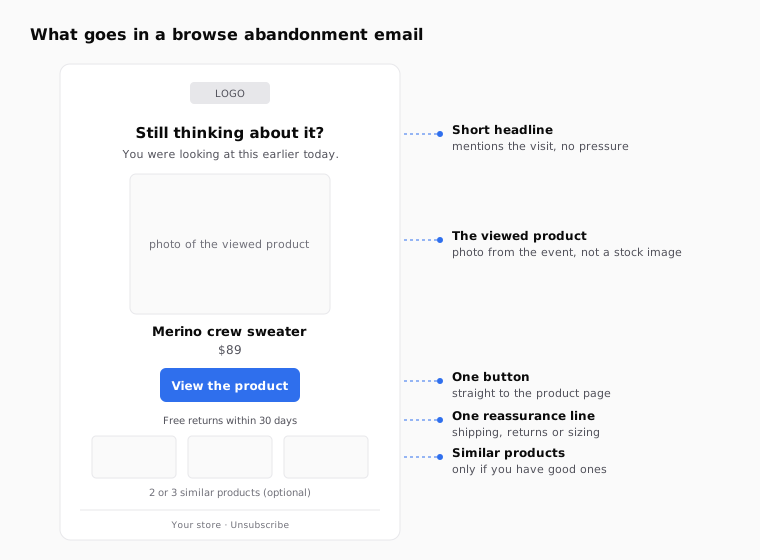
| Short headline | Yes | Mentions the visit without sounding like you're watching them | "Still thinking about it?" |
| The viewed product | Yes | Shows the exact item, with its own photo and price | The navy merino sweater, $89 |
| One button | Yes | Takes them straight to the product page | "View the product" |
| A reassurance line | Recommended | Answers the doubt that usually stops people | "Free returns within 30 days" |
| Similar products | Optional | Gives a way out if the item wasn't right | Two or three items from the same category |
| A discount | Usually no | Only makes sense in a second email, if your margin allows | "10% off with BACK10" |
A few rules make the difference:
- Use the real product. The photo, name and price should come from the event. A generic banner tells them nothing about what they wanted.
- One main action. If you add three buttons and a menu, you're back to a newsletter.
- Answer one doubt, not all of them. Pick the one that blocks most sales in your store. In fashion it's usually sizing or returns. In furniture, delivery. In skincare, whether it suits their skin.
- Mind the tone. "We saw you looking at…" sounds like surveillance. "Still thinking about it?" says the same thing more gently.
If you greet the customer by name, add a fallback so a profile without a first name doesn't get "Hi ,". The guide to Klaviyo's default value for first name shows how.
When should I send it?
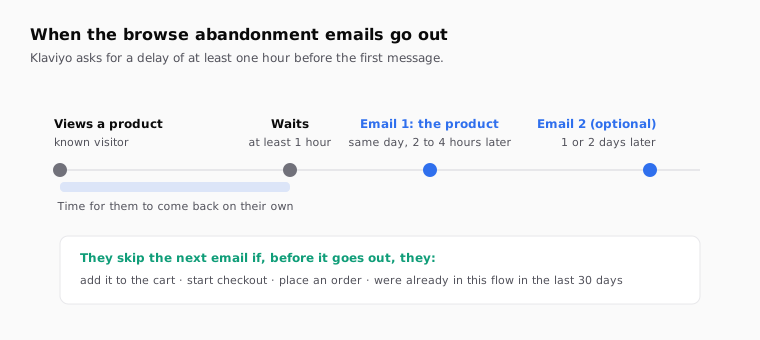
The same day, a few hours after the visit. Klaviyo's guide to creating a browse abandonment flow asks for a time delay of at least one hour before the first message. Checked against the Klaviyo documentation in October 2026.
Why not sooner? Because many people come back on their own. They look at a product on their phone at lunch and buy it on the laptop at night. If you email them ten minutes after the visit, you're interrupting a decision that was already on its way. The delay also gives the filters time to work: if they add to cart or buy during that wait, they skip the email.
Why not much later? Because the interest fades. In many stores, the first email works best within the same day.
| Your store | First email | Second email (optional) | Why |
|---|---|---|---|
| Low-price impulse buys (accessories, cosmetics) | 1 to 2 hours after | Next day | The decision is quick; a long wait loses it |
| Mid-price considered buys (clothing, shoes) | 2 to 4 hours after | 1 day later | Time to compare without forgetting |
| High-price slow buys (furniture, electronics) | 4 to 24 hours after | 2 or 3 days later | They research; a reminder too soon feels pushy |
These are starting points, not rules. Change one thing at a time and compare. If you want to know which email brings the visit back, tag each one with its own utm_content, as the guide to UTM parameters for email campaigns explains.
How many emails should I send, and what does each one say?
One or two. Browsing is a weak signal. A third email to someone who only looked at a product starts to feel like too much, and they haven't told you they want to buy.
| When | What it says | Incentive | |
|---|---|---|---|
| First | Same day, a few hours later | The product, its photo and price, one button, one reassurance line | No |
| Second, optional | 1 to 3 days later | The same product plus two or three similar ones, or a short review | Only if your margin allows, and not as a habit |
Skip the discount in the first email. That person may buy anyway. If every product view leads to a code, your customers learn to look and wait. If you do want an incentive, save it for the second email, or use one you already offer to everyone, such as free shipping above an amount. The free shipping threshold email guide has ideas for that.
For the subject line, describe the visit in plain words. "Still thinking about the merino sweater?" works better than a vague "Don't miss out." If you're unsure between two versions, the subject line A/B test guide for Klaviyo and Braze shows how to test them.
How do I set it up in Klaviyo?
With a flow triggered by Viewed Product, a few filters and a static product block. These are the steps Klaviyo describes.
- Make sure the event exists. In Klaviyo, check that the Viewed Product metric is receiving data. On Shopify, Klaviyo's app embed turns it on. On BigCommerce, you add the Viewed Product snippet to the product page template. On a custom store, you add the JavaScript snippet from Klaviyo's developer docs.
- Start from the prebuilt flow if you can. Klaviyo recommends it, because the product tags already work.
- Trigger. If you build it yourself, create a flow and choose Viewed Product as the metric trigger.
- Filters. Add these profile and flow filters, explained in Klaviyo's guide to flow triggers and filters:
- Placed Order zero times since starting this flow
- Started Checkout zero times since starting this flow
- Has not been in this flow in the last 30 days
- Added to Cart zero times since starting this flow, if you also have an added-to-cart flow
- Delay. Add a time delay of at least one hour before the first email.
- The product block. Use a static block, not a dynamic one. Klaviyo warns about this: the default abandoned cart email uses a dynamic block, and you shouldn't copy it for browse abandonment.
These are the tags Klaviyo's guide uses for the viewed product:
Product name:   {{ event.Name }}
Price:          {{ event.Price }}
Product link:   {{ event.URL }}
Image:          dynamic image block with event.ImageURL
Before you trust the tags, open a recent Viewed Product event in your account and check the property names. A custom integration can send the name under a different key, such as ProductName. Use what you see in your own data.
The same logic works on other platforms such as Braze or Iterable: a product view event, a delay, exit conditions for cart and purchase, and the product data from the event. The names of the event and fields change. Check them in your platform's documentation before you build.
What mistakes break a browse abandonment email?
Most of them come from sending too much, too soon, or to the wrong person.
| Mistake | What happens | How to avoid it |
|---|---|---|
| No delay, or a few minutes | You interrupt someone who was still on the site | Wait at least one hour, ideally a few |
| Missing cart and checkout filters | People get "still thinking?" after adding it to the cart | Filters for Added to Cart, Started Checkout and Placed Order |
| No frequency limit | Every visit triggers the flow again | "Has not been in this flow in the last 30 days" |
| A dynamic block copied from the cart email | The product appears empty or wrong | Static block with the event tags |
| A generic banner instead of the product | They don't recognize what they looked at | The photo, name and price from the event |
| A discount in every first email | Customers learn to browse and wait | No incentive first; at most in the second |
| A creepy tone | "We saw you looking" sounds like spying | Talk about the product, not the tracking |
How to do it with Remite
Remite builds the email with your brand and gets it ready for your platform. The flow, the delay and the filters live in your platform. Remite prepares what gets sent. Here's the real flow.
- Brand. Paste your store's address. Remite pulls the colors, logo, fonts and style.
- Brief. Describe the email: "Browse abandonment email for people who viewed a product and left. Short, no discount, one button to the product, a line about free returns." In the Antes de generar step, Remite reviews the brief and asks about anything missing, such as the tone or the doubt you want to answer.
- Sample product. Remite reads products, prices and photos from your site, so the preview shows one of your real products.
- The viewed product. On the product block, open Connect your data. For a single viewed product, choose My own code and paste the event tags from your platform, such as the Klaviyo ones above. The code goes in place of the products in the export. The preview keeps showing the sample product.
- Edits. Ask in the chat for changes: "Make the headline less pushy," "Add a row of three similar products below." Click any text to change it, or use Comment on a specific part.
- The second email. Ask for it in the chat: "Make a second version for the next day with two similar products and a short review."
- Subject and links. The Subject line card holds the subject line, the preheader and the A/B test. In Links you check that the button goes to the product, and the UTM card tags every link.
- Test and hand-off. Send me a test puts it in your inbox. Then Export gives you the HTML in your platform's syntax, or Enviar a (send to) creates the template in Klaviyo, Braze, Iterable, Salesforce or Brevo; all in beta except Brevo.
Automatic lifecycle diagnosis, which will look at your store and tell you which flows you're missing, is coming soon. Until then, the lifecycle page and the guide to lifecycle levers for online stores explain where browse abandonment fits.
Frequently asked questions
What is a browse abandonment email?
It's an automated email sent to a known visitor who viewed a product and left without adding it to the cart. It shows that product and invites them back to the product page.
When should I send a browse abandonment email?
A few hours after the visit, on the same day. Klaviyo asks for a delay of at least one hour before the first message.
How many browse abandonment emails should I send?
One or two. The first with the product, the second, optional, one to three days later with similar products or a review.
Should a browse abandonment email include a discount?
Usually not in the first one. Browsing is a weak signal, and constant discounts teach people to wait. If you want an incentive, keep it for the second email.
Why aren't all my visitors getting it?
Because the platform only tracks known browsers. In Klaviyo, that means people who clicked one of your emails or texts, or submitted one of your forms.
What's the difference between browse and cart abandonment?
Browse abandonment starts when someone views a product. Cart abandonment starts when they add it to the cart. The cart flow is closer to the purchase, so it can be more direct.
Does Remite set up the flow for me?
No. Remite builds the email with your brand and the viewed product, and exports or sends it to your platform. The trigger, delay and filters are set in your flow.
If you want to build your browse abandonment emails with your brand in a few minutes, you can join the Remite waitlist.