Welcome email discount code reminder: a series people actually use
Welcome email discount code reminder: how many emails to send, when to remind, how to add unique codes in Klaviyo and Braze, and how to exit buyers early.
Quick answer
Send the code in an email that goes out the moment someone subscribes, with the code at the top and a button that applies it. Then send a reminder two or three days later and a last call one or two days before the code expires. Each email should only go out if the person hasn't ordered yet. If you use unique codes, add them with your platform's tag: {% coupon_code 'Name' %} in Klaviyo or {% promotion('name') %} in Braze.
What you'll find
- Why people ignore the welcome code
- How many emails to send, and when
- What to put in each email
- Static code or unique code
- How to add the code in Klaviyo and Braze
- How to do it with Remite
Why do people ignore the welcome code?
They forget it, they can't find it, or they don't trust it. It's rarely because the discount is too small.
Someone types their email into the pop-up while browsing. They get the code. They close the tab. Two days later they don't remember the brand or where the email went. If the code is also buried at the bottom of a long email, the odds drop even further.
Before you raise the percentage, check these causes. They're cheaper to fix.
| Cause | How you spot it | What you change |
|---|---|---|
| The email arrives late | Minutes or hours pass between signup and send | Send the first email with no delay |
| The code is hard to see | It sits at the bottom, in small type or inside an image | Code at the top, as live text, large and easy to copy |
| It has to be typed in | The button goes to the homepage without the code applied | A button that applies the code, if your store supports it |
| Nobody reminds them | The series is a single email | Add a reminder and an expiry notice |
| The terms scare people off | High minimum spend or exclusions that show up at checkout | State the terms in one line, next to the code |
| They don't know what to buy | They open, click and leave without adding anything | Show best sellers or a clear place to start |
How many emails are in the series, and when does each one go out?
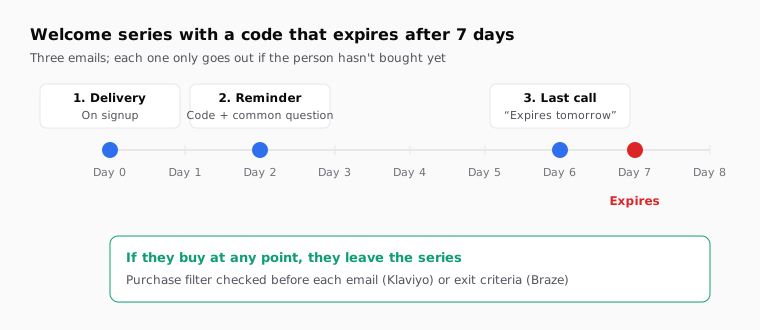
Three emails cover almost every case. One delivers the code, one reminds, one warns that it's about to expire.
The first goes out as soon as they subscribe. That's when they're still on your site waiting for it. The reminder goes out on day two or three, after they've closed the tab. The last call goes out one or two days before the code expires. That's why the code should have an expiry date: without one, a last call has nothing to say.
| When it goes out | What it does | If they already bought | |
|---|---|---|---|
| 1. Delivery | On signup, no delay | Gives the code and explains how to use it | Doesn't apply: they haven't had time to buy |
| 2. Reminder | Day 2 or 3 | Repeats the code and answers the most common question | Skipped |
| 3. Last call | One or two days before expiry | Says when it expires and repeats the code | Skipped |
| 4. Optional, no code | A few days later | Introduces the brand, reviews or the size guide | Can go out, with a different message |
If the code expires after seven days, the last call goes out on day 5 or 6. If it lasts fourteen, on day 12 or 13.
Some stores pack six or seven emails into the welcome flow. To get a code used, three are enough. The rest of the welcome, telling the brand story or explaining the product, can go in emails without a discount, sent to everyone.
What goes in each email of the series?
The same four things in all three, in a different order: the code, how to use it, when it expires and a button. What changes is what surrounds them.
The first email is short. At the top, the code in large live text, never inside an image, so it can be copied. Below it, one line of terms: "10% off your first order over $30, until October 18". Then a button. If your store accepts the code in a URL, the button can carry it already applied. Shopify, for example, lets you share a link from the discount's page that applies it on click. Under the button, three or four products to start with.
The reminder answers the question that holds people back. It depends on what you sell. In apparel it's usually sizing. In skincare, skin type. In food, shipping and freshness. Answer it in two or three sentences and show the code again.
The last call is the shortest of the three. One line with the date: "Your 10% expires tomorrow". The code. The button. Nothing else.
In the last call's subject line, the date works better than made-up urgency. "Your code expires Friday" says something specific. "Last chance!" is what every other email in the inbox says.
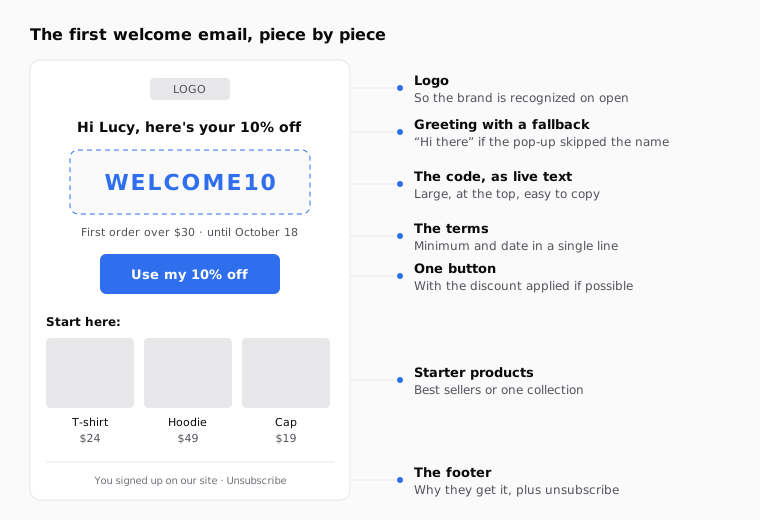
If you greet people by name, remember that many pop-ups only ask for an email address. Always set a fallback so you don't send "Hi ,". The guide to Klaviyo's default first name covers it.
Should I use a static code or a unique code?
It depends on how much you care about the code getting shared. A static code, like WELCOME10, is the same for everyone. A unique code is different for each person and works once.
| Static code | Unique code | |
|---|---|---|
| Example | WELCOME10 | WELCOME10-7KQ2M |
| Setup | You create it once in your store | Your email platform generates it or pulls it from a list |
| If it gets shared | Anyone who finds it on a coupon site can use it | It works for a single order |
| Per-person expiry | No: it expires for everyone at once | Yes: it can expire X days after each send |
| Last call with a date | Only if the date is the same for everyone | Fits well, since each person has their own window |
| Risk of running out | None | If the list runs out, some emails don't send |
For a small store getting started, a static code is fine. Once you see your code on coupon sites, or you want each person to get seven days from the moment they subscribe, switch to unique codes.
How do I add the code in Klaviyo and Braze?
With a static code, type it into the email as is. With unique codes, each platform has its own tag.
Klaviyo. Create the coupon under Content > Coupons. If you're on Shopify, Klaviyo can generate unique codes for you. In flows, you can make them expire a set number of days or hours after sending, or on a fixed date. Then insert the coupon with the coupon block or with this tag, using the exact name, capitalization included:
{% coupon_code 'Welcome10' %}
Each person always gets the same code, even if the tag appears in several emails. In Klaviyo's in-app preview, you'll see the coupon name followed by "-PREVIEW". Watch out in flows: Klaviyo can't check ahead of time whether there are enough codes, and if they run out, the email is skipped. See Klaviyo's coupon code guide and its guide to unique coupon codes for Shopify.
Braze. Upload a list of codes under promotion codes and give it a snippet name. In the message, use:
{% promotion('welcome10') %}
Braze deducts the code before sending. If the list expires or runs out, subsequent messages are aborted, so upload more codes than you expect to use. Test sends also use up codes by default, unless your account manager changes that. It's all in the Braze promotion codes documentation.
Checked against the Klaviyo and Braze documentation in October 2026.
| Platform | Unique code | What to watch |
|---|---|---|
| Klaviyo | {% coupon_code 'Welcome10' %} |
Exact coupon name; in flows it won't warn you if codes run short |
| Braze | {% promotion('welcome10') %} |
Test sends use codes; if the list runs out, the message is aborted |
| Any platform | The static code typed as is | It must match the store's code character for character |
If you want Braze to show something different based on a profile attribute, like language, the guide to Braze custom attributes in Liquid walks through it. Keep in mind that with conditional Liquid, Braze deducts a code from every list referenced, even if only one branch is shown.
How do I take buyers out of the series?
With a condition checked before every email, not just at entry. If someone orders on day 1, they shouldn't get the day 2 reminder.
In Klaviyo, the welcome flow usually starts when someone joins the pop-up list. Add the profile filter Placed Order zero times since starting this flow. Klaviyo checks it before each send and removes anyone who has ordered. In Braze, add Make Purchase as an exception event in the Canvas exit criteria. Braze applies it even while the person is waiting in a Delay step.
Think about existing customers too. If someone who has already bought from you signs up through the pop-up, a first-order discount they can't use is irritating. You can filter entry so only people with no orders get in, or send them a different welcome without a code.
What mistakes keep the code from being used?
Most of them are setup mistakes. You'll spot them as soon as you send a test to your own inbox.
| Mistake | What happens | How to avoid it |
|---|---|---|
| Code inside an image | It can't be copied and disappears when images are blocked | Code as live text |
| Button goes to the homepage | They have to remember the code at checkout | Button with the discount applied, or to a collection |
| No expiry date | The last call makes no sense and the code circulates forever | Set a date and state it in the email |
| No exit condition | Buyers get "you haven't used your code yet" | Purchase filter before every email |
| Misspelled coupon name | In Klaviyo the code doesn't get inserted | Copy the name exactly as it appears in Coupons |
| Code list too short | Braze aborts the message; Klaviyo skips the email | Upload more codes than you expect to use |
| Discount sent to existing customers | They get a code they can't use | Filter entry or build a separate welcome |
Measure each email in the series separately. That's how you know whether the reminder and the last call are pulling their weight. The guide to UTM parameters in email campaigns shows how to tell each email apart with utm_content. If you're torn between "Your 10% is waiting" and "Need help choosing?" for the reminder, test them with the subject line A/B test guide.
How to do it with Remite
Remite builds all three emails with your brand and your products, ready for your platform. You set up the series, the delays and the conditions in your flow. Here's the actual workflow.
- Brand. Paste your store's URL. Remite pulls your colors, logo, fonts and style.
- Brief. Describe the first email: "Welcome for people who sign up through the pop-up. 10% off the first order over $30, valid for seven days. Big code at the top and products to start with." Type the code into the brief's Código (code) field. In the Antes de generar step, Remite reviews the brief and asks about anything missing, like tone or terms.
- Products. Remite reads products, prices and photos from your site. Ask in the chat for the ones you want: "Show the four best sellers from the fall collection."
- The other two emails. Ask in the chat: "Make the day 2 reminder, answering the sizing question" and "Make the last call with just the date, the code and the button." Tweak anything by editing the text directly or with Comment on top of it.
- Subject, links and UTM. The Subject line card holds the subject line, the preheader and the A/B test. In Links you check the button goes where it should. The UTM card tags every link.
- Test and export. Send me a test puts it in your inbox. Then Export gives you the HTML in your platform's syntax, or Enviar a (send to) creates the template in Klaviyo, Braze, Iterable, Salesforce or Brevo; all in beta except Brevo.
If you use unique codes, swap the typed code for your platform's tag in the template and send a test before turning the flow on. Automatic lifecycle diagnosis, which will look at your store and tell you which levers you're missing, is coming soon. Meanwhile, the lifecycle page and the guide to lifecycle levers for online stores show where the welcome series fits.
Frequently asked questions
How many emails should a welcome discount series have?
Three are enough for the code: delivery, reminder and last call. If you want to tell more of your brand story, do it in separate emails without a discount.
When should I send the discount code reminder?
Two or three days after signup. By then the person has closed the tab and has probably forgotten.
How long should a welcome code last?
Long enough to decide, short enough for a last call to make sense. Seven or fourteen days are common windows. Pick one and say it in the email.
Is a static code or a unique code better?
A static code is easier to set up. A unique code keeps it off coupon sites and lets it expire a set number of days after each send.
How do I add a unique code in Klaviyo?
Create the coupon under Content > Coupons and use {% coupon_code 'Name' %} with the exact name. Each person always gets the same code.
Do test sends use up codes?
In Braze, yes, by default. In Klaviyo, the in-app preview shows the coupon name with "-PREVIEW", while previews sent outside the app do use real codes.
How do I stop the reminder from reaching people who already bought?
With a condition checked before each email. In Klaviyo it's the Placed Order zero times since starting this flow filter; in Braze, a Make Purchase exit criterion.
Does Remite create the unique codes?
No. Your store or your email platform creates the codes. Remite builds the emails with your brand, places the code you give it, and exports or sends them to your platform.
If you'd like your welcome series ready with your brand and products in a few minutes, you can join the Remite waitlist.